A menu for every table, one scan away.
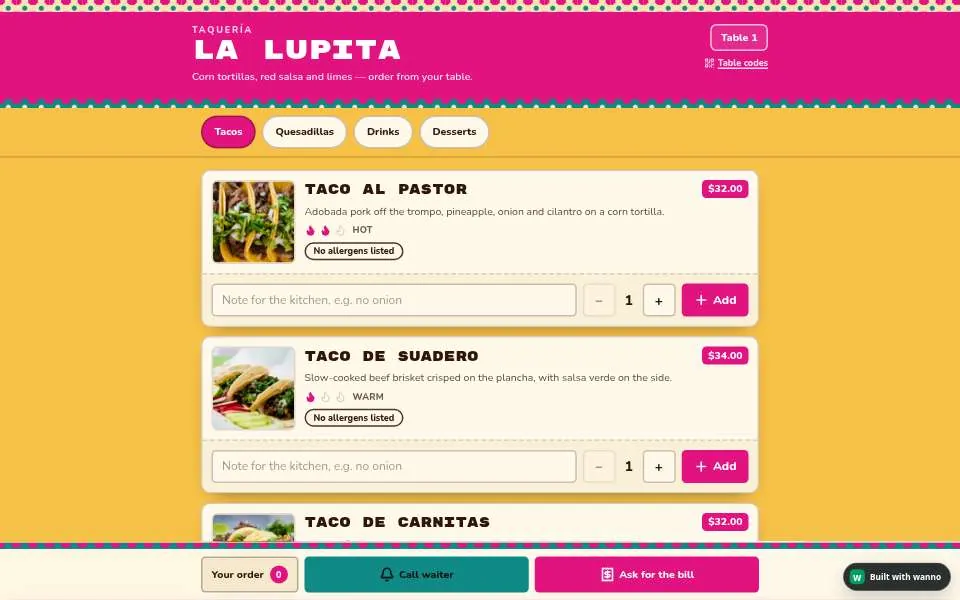
A menu guests open by scanning a QR code, always up to date. Add ordering from the table if you want it.
Not sure about the details? wanno asks a few simple questions and plans it with you.
How it works
It always starts with an idea.
- Tell wanno your idea“I’m opening a café.” One sentence is enough to begin.
- wanno guides youA few simple questions about your style and details. Not sure? It suggests the rest.
- It’s livePublish in one tap and share the link with anyone.
- Change anything, anywhereEdit or customize anything just by asking, from your computer or the iOS and Android apps.
Ideas to include
Make it do what you need.
A few things people often ask for. Add any of them, or describe something else.
- Your menu onlineDishes, prices and photos, easy to update.
- A QR code for each tableGuests scan it to see the menu on their phone.
- Dietary infoMark allergens, vegetarian or spicy dishes.
- Ordering from the tableLet guests order from their phone, if you want to.
How do guests open the menu?
They scan the QR code on their table with the phone’s camera. There is nothing to download or install.
Can I change dishes and prices later?
Yes. Ask wanno and the menu updates right away. The QR codes keep working, because they always point to the same menu.
Can guests order and pay from the table?
They can send their order from their phone. Paying at the table works with Stripe or Mercado Pago once you connect your account.