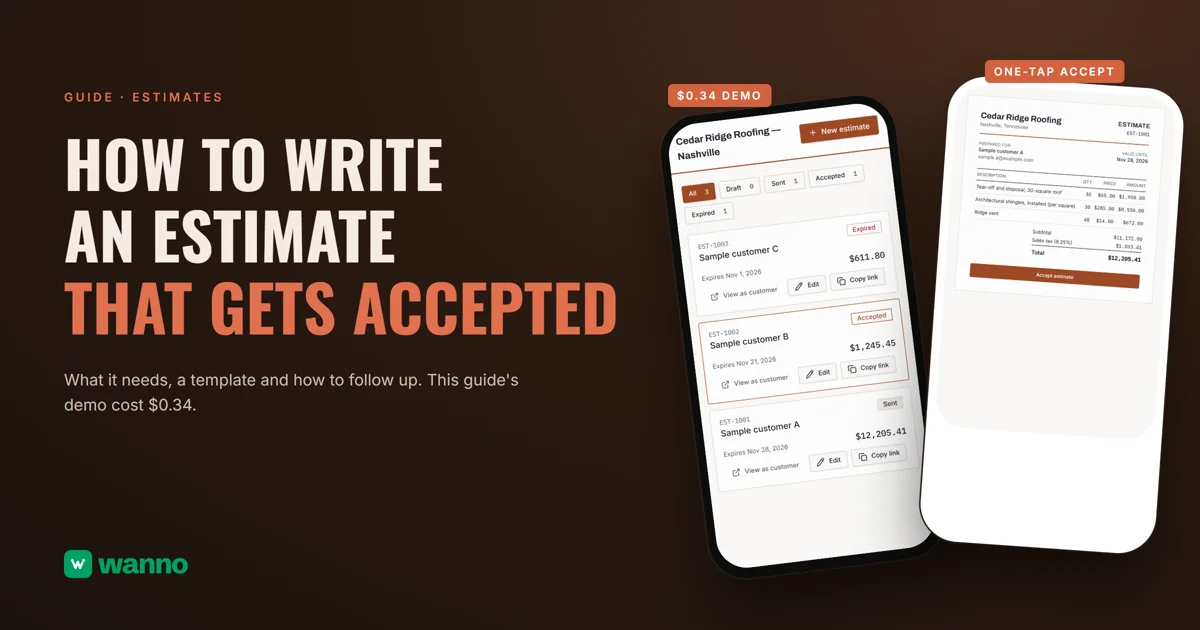
If you're figuring out how to write an estimate, the price is rarely what stalls it. The customer can't tell what's included, doesn't know how long the number holds, or has no easy way to say yes. This guide covers what to include, a template to copy, and four ways to produce one. We also built one: Cedar Ridge Roofing's estimate maker, where each customer opens their own link and accepts with one button, took 2 minutes 4 seconds and cost $0.34 in total, including two adjustments.
The summary:
| Option | What it costs | The limit |
|---|---|---|
| Word or Excel | what you already own | math, numbering and tracking are manual |
| Invoicing app (Wave, Invoice Ninja) | both have a free plan | built for invoicing; the estimate is one feature |
| Field-service app (Jobber) | no free plan, free trial | a full job-management tool, which may be more than you need |
| Your own generator with AI (wanno, web app) | the one in this guide cost $0.34 in total (two adjustments included) | lives on a wanno.dev subdomain, with a "Built with wanno" badge on the free plan; you send the link yourself |
01. What an estimate needs to get accepted
An estimate that gets accepted answers five questions before the customer asks them.
- Who and for whom. Your business name, city, an estimate number and the customer's name. The number is how you find it later.
- What's included, line by line. "Tear-off and disposal, 30-square roof" is clear; "roof job" is not. Each line gets a quantity and a price, so the customer can question one line without rejecting the whole thing.
- The total, with tax visible. Subtotal, sales tax and total on separate lines.
- An expiration date. It protects your pricing when material costs move and gives the customer a deadline. Without one, the estimate sits.
- Terms. Deposit, payment method, start date and what's not included, one line each.
A sixth habit isn't on the page: follow-up. Note the day you sent it and write again before it expires.
02. Estimate or quote, and where to build one
The two words get used loosely. Bench calls an estimate a rough, educated guess that isn't legally binding, and a quote an offer to do the job for a fixed price within a set timeframe. GoCardless agrees that an estimate can move up or down with the scope. Those are business guides, not law, so state on the document which one it is and what happens if the scope changes.
Word or Excel. Excel adds up the lines, but numbering, status and who accepted what are on you. Fine for a few a month.
Invoicing apps. Wave's free plan lets you create unlimited estimates and invoices, and its paid plans are priced in US dollars. Invoice Ninja also has a free plan, capped by number of clients. If you already invoice there, keep your estimates in the same place.
Field-service apps. Jobber has no free plan, only a free trial. It puts quotes inside a larger job-management tool, so if you only need a clean estimate, check whether you'd use the rest.
Your own generator with AI. You ask an AI for a page with your line items, your tax and a link per estimate, in your brand. The customer gets a link and taps accept: no printing, no signing. To keep those customers in one place afterward, see how to pick a CRM for a small business.
03. How to write an estimate with AI, step by step
With wanno you describe your tool in one message, from your phone, and the platform builds it. The one in this guide was requested like this:
I want an estimate maker for my roofing business in Nashville, Cedar Ridge Roofing: create an estimate with customer, line items, quantity, price in dollars, sales tax, total and expiration date; each estimate gets its own link so the customer can view it and accept it with one button; and a list with the status of each one. Load 3 sample estimates. Save everything in the cloud. The main screen must be visible without signing in, showing the sample estimates, and only creating or editing asks for a password. Everything visible in the app must be in English.
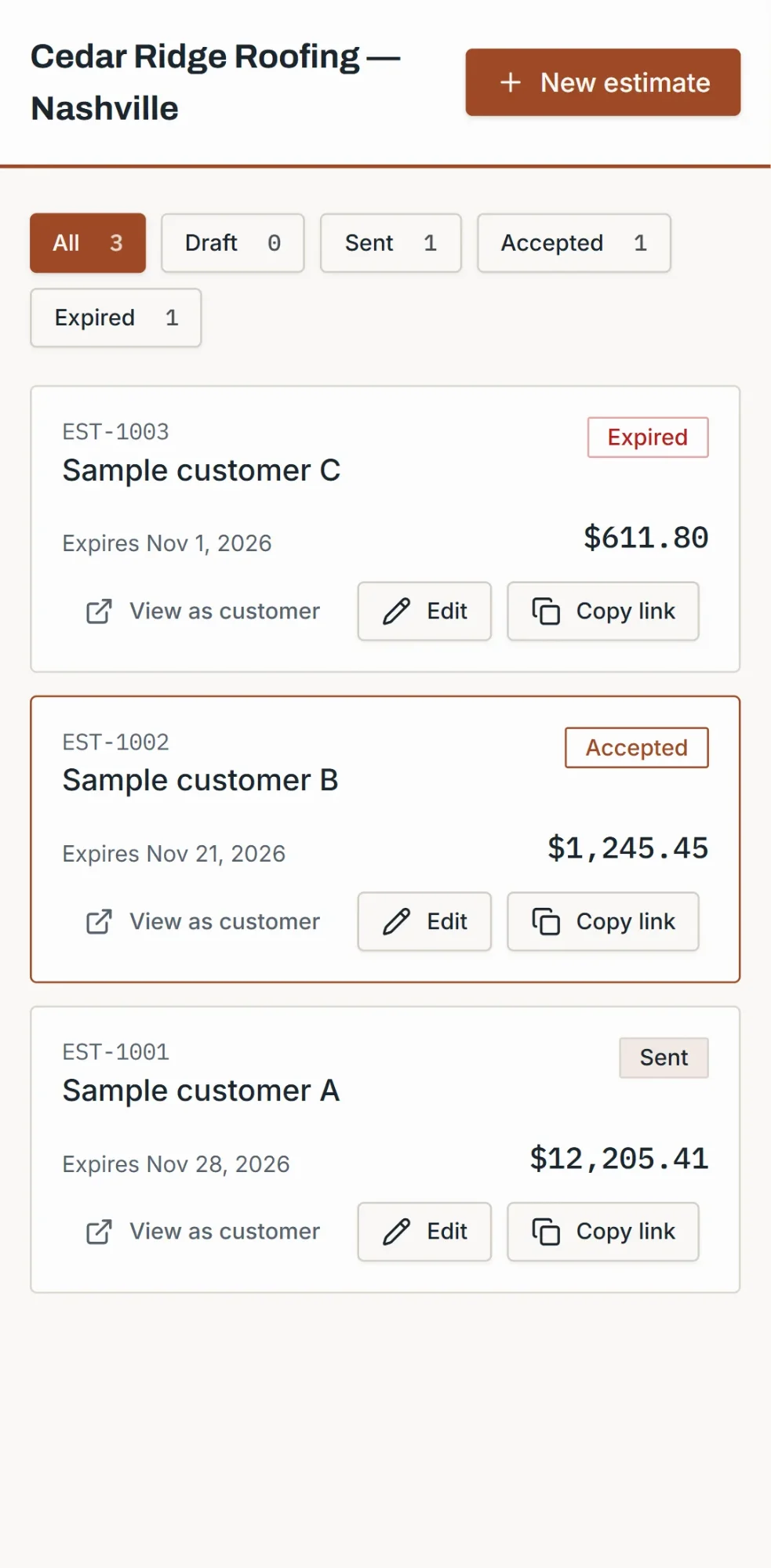
wanno built it on its own in 2 minutes 4 seconds and 17 steps, and it worked on its test link. The list shows the three sample estimates with number, amount, expiration date and status, plus filters by status and an Edit button on each.
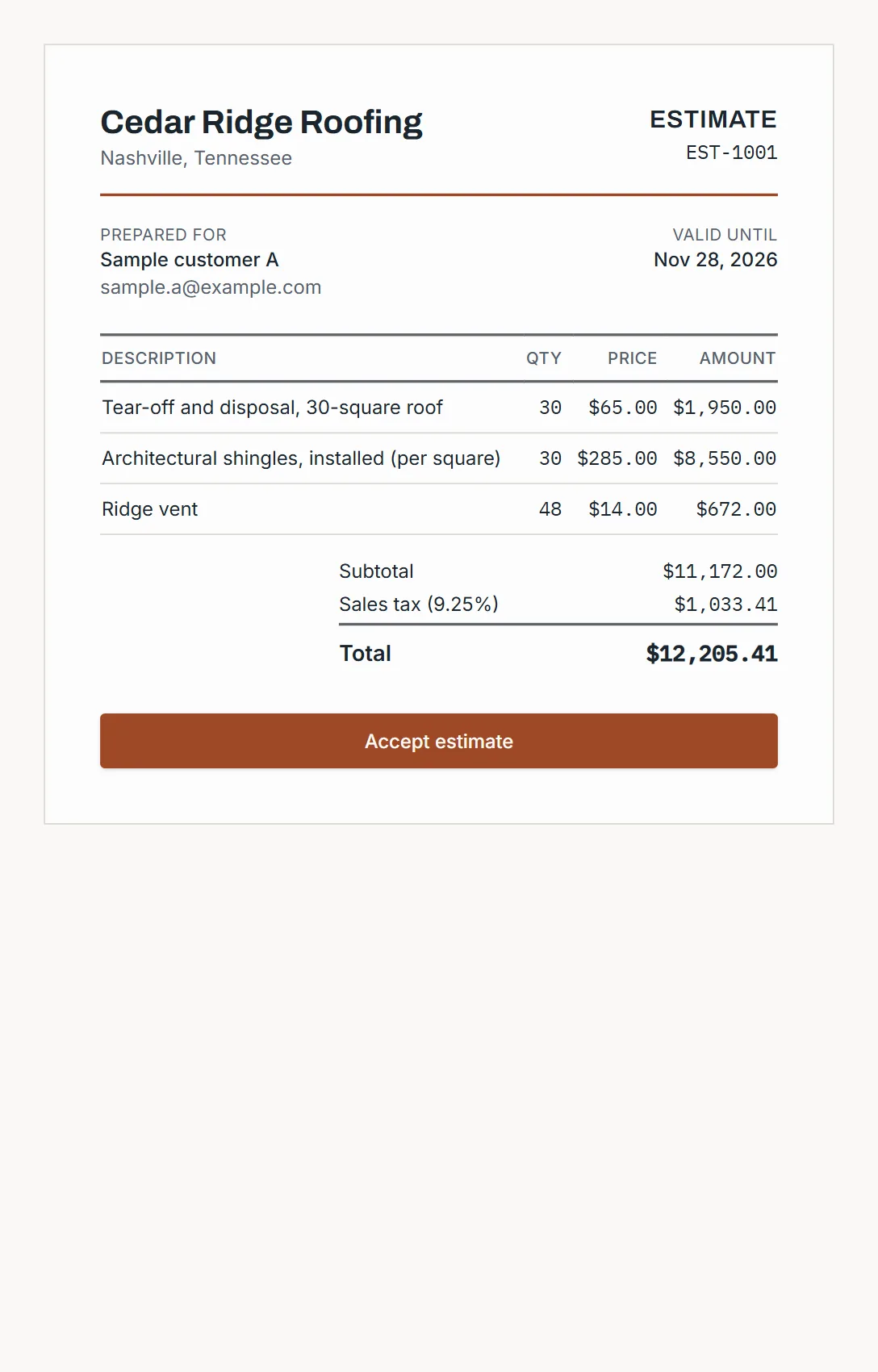
Each estimate has its own customer page: business name, estimate number, valid-until date, line items with quantity, price and amount, subtotal, sales tax, total and an "Accept estimate" button. On EST-1001, 30 squares of tear-off at $65.00, 30 squares of shingles at $285.00 and 48 ridge vents at $14.00 add up to $11,172.00 before tax, and $12,205.41 with the demo's sample 9.25% sales tax. When the customer accepts, a rotated "ACCEPTED" stamp appears with the date and the status in your list updates. Expired estimates can't be accepted, and the page prints on one page.
Cedar Ridge Roofing is an example business, and its customers, line items and prices are samples. Creating or editing asks for the password you choose when you activate the panel, and totals update as you type. After saving, "Copy customer link" gives you the estimate's link: set it to Sent first, open it yourself as a good habit, then send it however you already talk to the customer.
If you'd rather start on paper, copy this template:
ESTIMATE #____        Date: ____
From: [your business, city, phone]
Prepared for: [customer name]
Job: [one line on what's included]

Description | Qty | Price | Amount
____ | ____ | ____ | ____

Subtotal: ____
Sales tax (__%): ____
Total: ____

Valid until: ____
Terms: deposit ____, payment ____, start date ____, not included ____
To accept: reply "Accepted" or use the button on the link
Questions: [your phone]04. What it costs to write estimates with your own tool
The demo cost $0.34 in credits (3.4 credits): 1.9 for the build and two adjustments of 0.7 and 0.8 to add a public "View as customer" link to the list. That fits in two days of wanno's free daily credit: $0.30 a day, capped at $1.50 a month. You don't need a subscription to keep using it: it stays on a link ending in wanno.dev, with the "Built with wanno" badge.
For comparison: the $0.34 was paid once, while paid plans of invoicing and field-service apps are subscriptions. You pay at wanno only to remove the badge, use your own domain, or make more changes than the free credit covers. The Starter plan is $4.99 a month with $10 in credits included (see plans).
Send an estimate your customer can accept in one tap
A good estimate is short, has an expiration date and gets accepted in one step. Describe your estimate maker in wanno and see the result; trying it is free. Once jobs start closing, track the money with a cash flow template.
Frequently asked questions
What's the difference between an estimate and a quote? Commonly, an estimate is approximate and a quote is a fixed price for a defined job, but that isn't a rule everywhere: say which one yours is on the document.
How long should an estimate be valid? As long as you can hold your price. If material costs move often, a week or two; otherwise longer. What matters is that the date is written down.
Should I list sales tax separately? Yes, so the customer sees how you got to the total. The rate depends on where you work and what you sell, so confirm it with an accountant.
When do I follow up? Two or three days after sending, and again before it expires. A short message with the link is enough.
Read also: How to connect a custom domain to your site from your phone
Download wanno on the App Store · Download wanno on Google Play