If you're looking for a CRM for small business, your clients are probably scattered across a notebook, text threads and a spreadsheet, and you want one place that shows who you quoted, who's about to buy and who needs a call tomorrow. You have four options: a CRM with a free plan, a paid CRM, a spreadsheet, or a simple CRM built around your business with AI. This guide compares them using the vendors' own pricing pages, then builds one from start to finish: a CRM for a sample real estate team, with a pipeline board and dollar totals. It took 2 minutes 12 seconds and cost $0.20, which fits inside one day of free credit.
The summary:
| Option | What it costs | The limit |
|---|---|---|
| CRM with a free plan (HubSpot, Bitrix24) | $0 | Bitrix24 Free is for 1 or 2 users; sales pipelines and WhatsApp integration come with Basic |
| Paid CRM (Pipedrive, Bitrix24 Basic) | Pipedrive Lite: $14 per user per month, billed annually. Bitrix24 Basic: $49 a month, billed annually, per organization, with 5 users | a fixed cost; Pipedrive has no free plan, only a 14-day trial |
| Spreadsheet | free | it never reminds you of anything: you have to remember every follow-up |
| A simple CRM built with AI (wanno, web app) | the one in this guide cost $0.20 in total | it lives on a wanno.dev subdomain, with a "Built with wanno" badge on the free plan; made for a small business, not a big team |
01. What a CRM is, and why a notebook and a text thread fall short
A CRM (customer relationship management tool) keeps your clients and open deals in one place: who each contact is, what stage the conversation is at, what the deal is worth and when to reach out again. In a text thread, a quote gets buried within two days. In a notebook, nothing tells you a follow-up is overdue.
Try this quick test: right now, do you know how many deals you have open, what they add up to and which follow-ups are overdue? If the honest answer is "roughly," you need a sales pipeline: a board with one column per stage (lead, proposal, closed) where each card is a deal.
A small team needs only a few things from a CRM: contacts, a pipeline, tasks with due dates and a monthly report.
02. CRM for small business: free and paid options, and what they cost
HubSpot offers a free CRM. Bitrix24 has a $0 Free plan for 1 or 2 users, with basic CRM, tasks and 5 GB of storage. Its Basic plan costs $49 a month billed annually ($588 a year) or $69 billed monthly. It's priced per organization and includes 5 users.
Pipedrive has no free plan, only a 14-day trial. Its Lite plan costs $14 per user per month billed annually, or $168 per user per year. It's built for sales, and it's a fixed cost however much you use it.
Before you choose, check four things:
- Users: how many people the free plan covers, and what happens when you add one more.
- Features: whether what you use daily, like the pipeline or WhatsApp, is in the free plan.
- Pricing model: with five people, Pipedrive Lite comes to $70 a month while Bitrix24 Basic stays at $49, both billed annually.
- Exit: whether you can export your contacts if you ever switch.
The other route is a small CRM built around how you sell: your fields, your stages, your currency, no extra menus. You pay a build cost instead of a subscription. The tradeoff: it doesn't come with the integrations, permissions or support of a large platform.
03. How to build a custom CRM with AI, step by step
With wanno you describe your CRM in one message, from your phone, and the platform builds it. Name your industry, what you want to track and your currency. This one was requested like this:
I want a complete CRM for my real estate team: contacts with history, a sales pipeline as a stage board, follow-up tasks and reminders, notes per client and a monthly sales report in US dollars. Use sample data. Everything visible in the app must be in English.
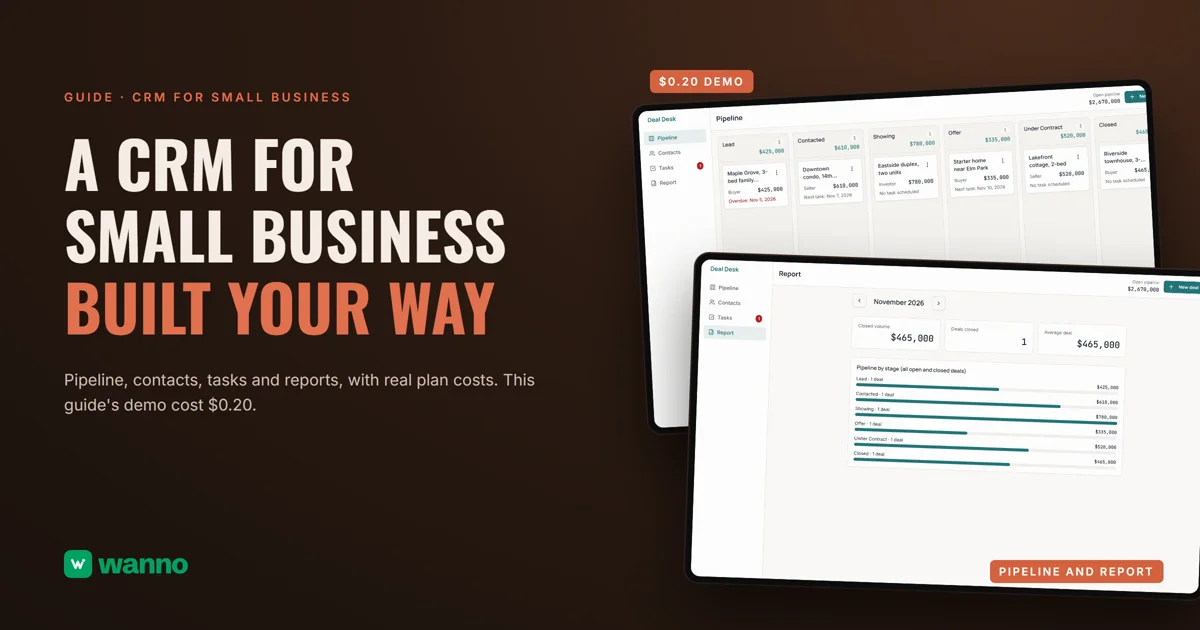
wanno built it in 2 minutes 12 seconds and 16 steps, and the CRM was running on its trial link. The main screen is the pipeline: six stages from Lead to Closed, each with a deal count and a dollar total, plus a "New deal" button and the open pipeline total at the top ($2,670,000). The menu has four sections: Pipeline, Contacts, Tasks and Report.
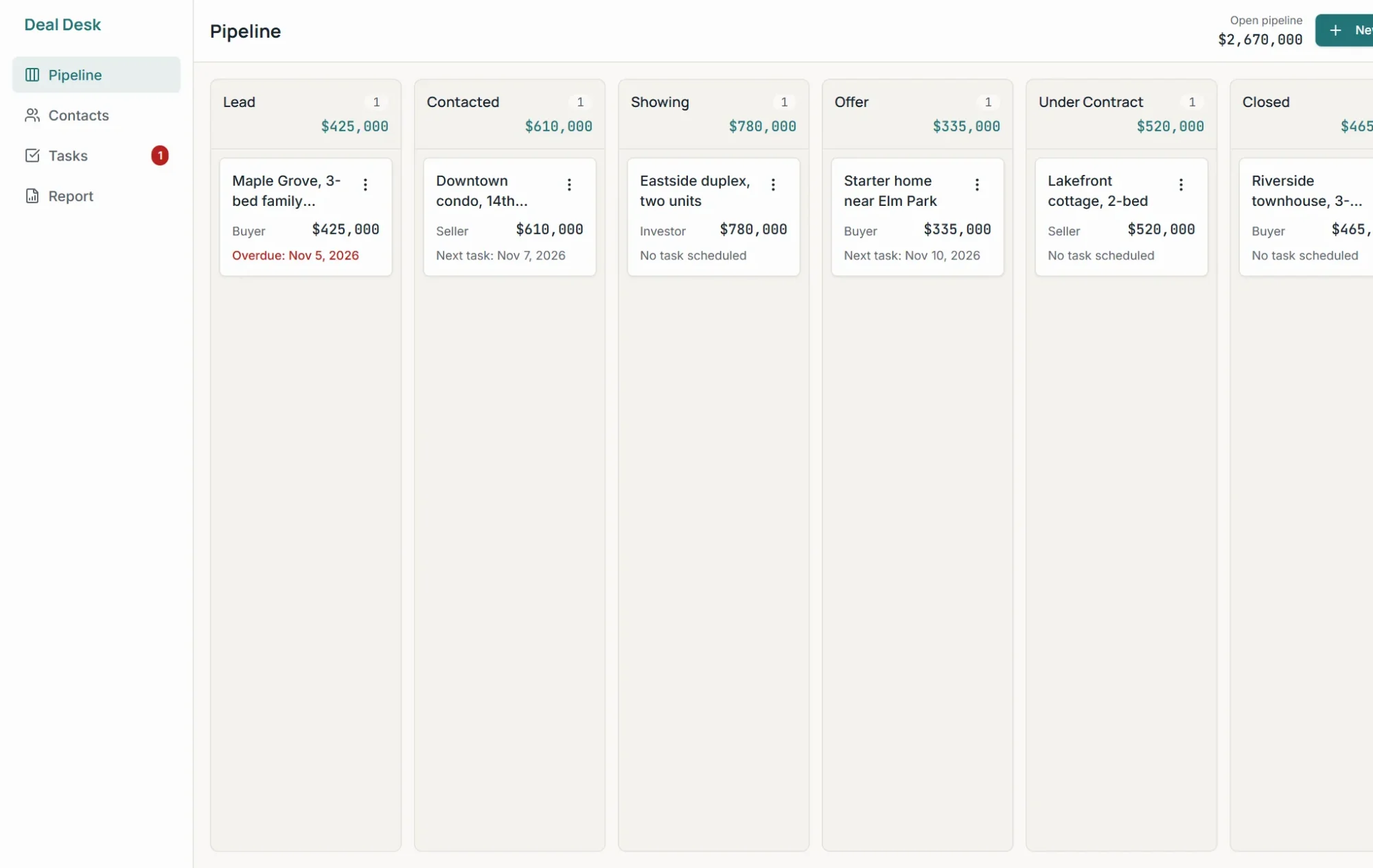
Each card shows the deal, the contact type (Buyer, Seller or Investor), the amount and the next task, with a red "Overdue" flag when its date has passed. You drag a deal to another column or use the menu on the card, and each move is added to that contact's history. Every contact has a profile with details, tasks and notes. Tasks are grouped into overdue, today, upcoming and done. The report lets you pick a month and shows closed volume, deals closed and average deal. Everything is saved and available from any device, and the whole team sees the same data.
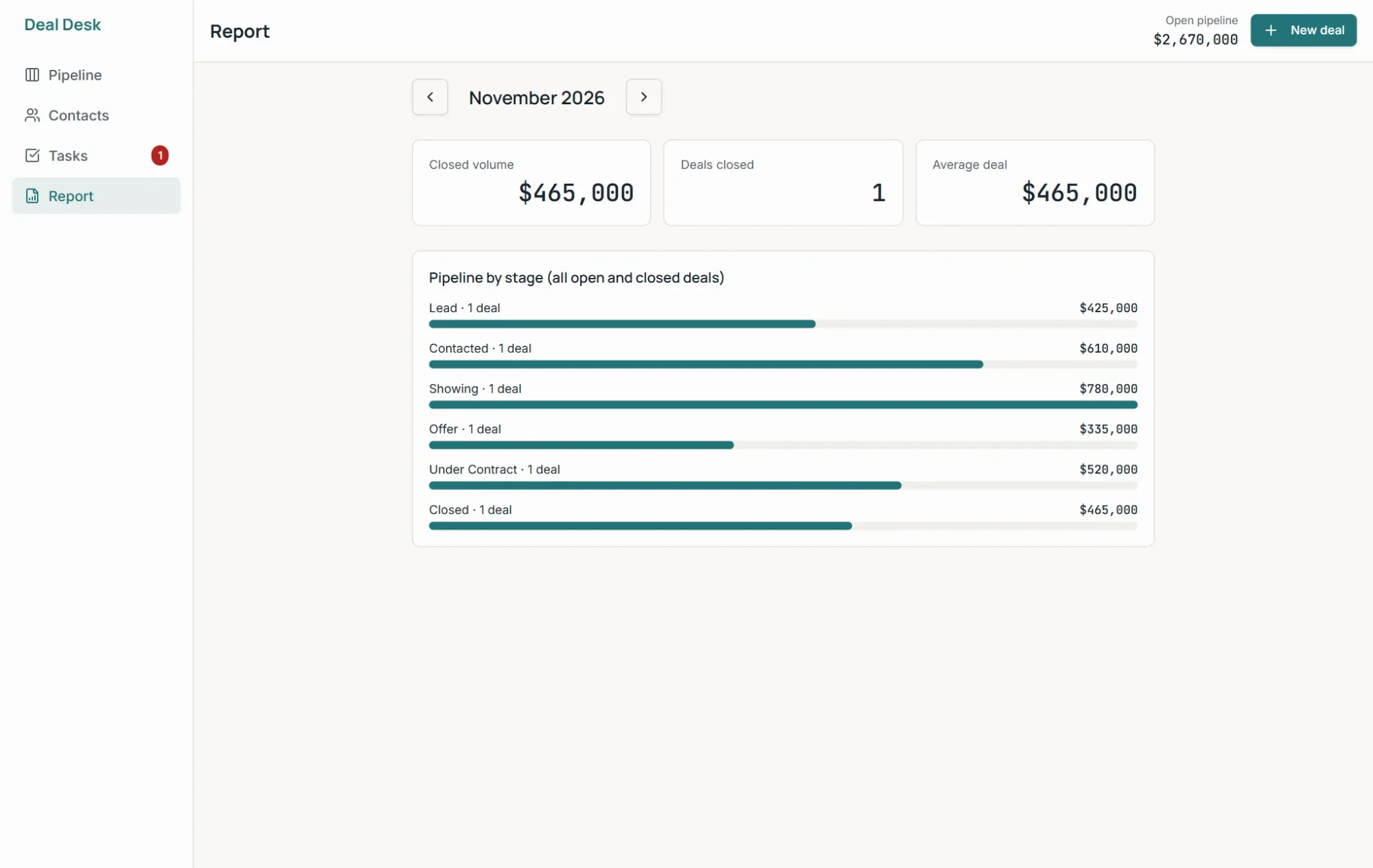
All the data you see (deals, amounts, team) is sample data: you replace it with your own.
04. What a CRM like this costs
The build cost $0.20 in credits (2 credits), covered by the free credit wanno gives you every day ($0.30, with a monthly cap of $1.50). You only spend more when you ask for a new change in the chat.
To compare: $0.20 is paid once; a paid plan like Pipedrive Lite ($14 per user per month, billed annually) works out to $0.47 a day, every day. They aren't the same kind of product: Pipedrive is a full platform with support and integrations. If you want your own domain and no badge, wanno's Starter plan costs $4.99 a month with $10 in credits included (see plans).
You can also give your business a public face: a digital catalog, an online store with an admin panel or an app for your business.
A free CRM or one made for you: how to decide
If it's just you or you and one other person, start with a free plan from HubSpot or Bitrix24. If you want a simple CRM with your own stages and currency, describe yours on wanno and see the result: trying it is free. If your team grows and needs integrations and permissions, go with a large platform.
Frequently asked questions
Is there really a free CRM? Yes. HubSpot has a free CRM, and Bitrix24 has a Free plan for 1 or 2 users. Pipedrive doesn't: it offers a 14-day trial. wanno's free plan gives you credit every day, enough to build a small CRM like this one. You pay only if you want to remove the badge, use your own domain or ask for more changes than the free credit covers.
What is the best CRM for a small business? The one your team will use every day. Compare how many users are included, whether it covers your pipeline and what you'll pay with everyone on board.
Does a CRM built with wanno replace HubSpot or Pipedrive? No. Those products come with integrations, team permissions and support. A CRM built with wanno is for a small business that needs contacts, a pipeline and follow-ups.
Can I open my CRM from my phone and my computer? Yes. It's saved, so it's there from any device, and the whole team sees the same data.
Read next: How to connect a custom domain to your site from your phone
Download wanno on the App Store · Download wanno on Google Play