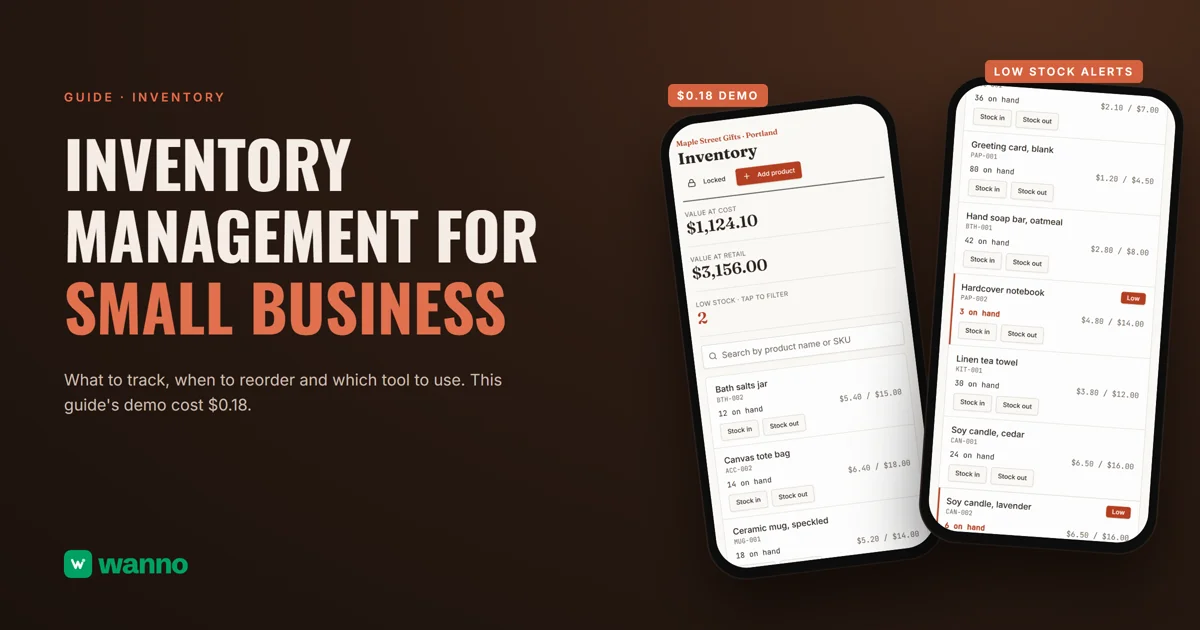
Inventory management for small business comes down to three questions: what do you have, what is it worth, and what is about to run out? This guide covers what to track, reorder points, counts and FIFO, and compares a spreadsheet, an app like Sortly and your own system built with AI. The demo, a gift shop's inventory with 12 sample products, took 1 minute 44 seconds and cost $0.18, within one day of free credit.
The short version:
| Option | What it costs | The catch |
|---|---|---|
| Spreadsheet | nothing extra if you already use Excel or Google Sheets | someone has to update it by hand, and it won't warn you when something runs low |
| Inventory app (Sortly) | free plan with 100 unique items; a plan like Advanced is $49/month at list price | billed in US dollars, and prices can change |
| Your own system with AI (wanno, a web app) | the one in this guide cost $0.18 in total (within one day of free credit) | lives on a wanno.dev subdomain, with a "Built with wanno" badge on the free plan |
01. What to track in your inventory
A useful inventory needs few fields, but complete ones. For each product: a short, unique SKU (BTH-001 for oatmeal soap, say), the name and unit, the units on hand, the cost and retail price (so you know how much money sits on the shelves and what it's worth at retail) and a minimum that signals it's time to reorder (more on that below).
And for each movement: date, stock in or out, quantity and who recorded it. If something is off, fix it with a new movement instead of overwriting the number, so the trail stays intact.
02. Reorder points, cycle counts and FIFO
Reorder point. It's the quantity at which you place an order, not the one that leaves you with nothing. A practical way to set it: average daily sales times the days your supplier takes to deliver, plus a safety cushion for delays or a busy week. With example numbers: if you sell 2 a day and the supplier takes 5 days, you need 10 to cover the wait; add a cushion of 4 and your reorder point is 14.
Cycle counts. The system says what should be on the shelf; a physical count confirms what is. A rotation works: count one group each week (best sellers or priciest items) and review the rest less often. When there's a gap, record it as an adjustment and write down why.
FIFO (first in, first out). It means the items you received first are the first ones you sell. It matters when products expire or go out of season, because you should sell the oldest first, and when your cost changes between purchases, because it decides which cost you record on each sale. The IRS describes the method this way in Publication 538: "The FIFO (first-in first-out) method assumes the items you purchased or produced first are the first items you sold, consumed, or otherwise disposed of." Which method you may use for taxes is a question for your accountant.
Why a spreadsheet falls short. With 30 products and one person, a spreadsheet works. It starts to fail when:
- two people edit it and you end up with two versions;
- nobody knows who changed a number or when;
- it never warns you that something dropped below its minimum: you have to go look;
- on a phone, in the stockroom, it's awkward to use.
At Sortly, the Advanced plan drops from $49 per month to $24 for the first year on a promotion billed annually ($288), per its pricing page in US dollars; prices can change.
The third option is this guide's: asking an AI for your own system, with your fields, your minimums and your currency. If you plan to sell online later, see how to sell clothes online or how to build a digital catalog, and to balance what you buy against what comes in, a cash flow template.
03. How to set up inventory management with AI, step by step
With wanno you describe your system in one message, from your phone, and the platform builds it. Here's the prompt behind this guide's demo:
I want an inventory management app for my gift shop in Portland, Maple Street Gifts: a product list with SKU, stock on hand, cost and retail price in dollars, stock in and stock out records, low stock alerts, total inventory value and search. Load 12 sample products. Save everything in the cloud so I can see it from any device. The main screen must be visible without signing in, showing the sample data, and only recording changes asks for a password. Everything visible in the app must be in English.
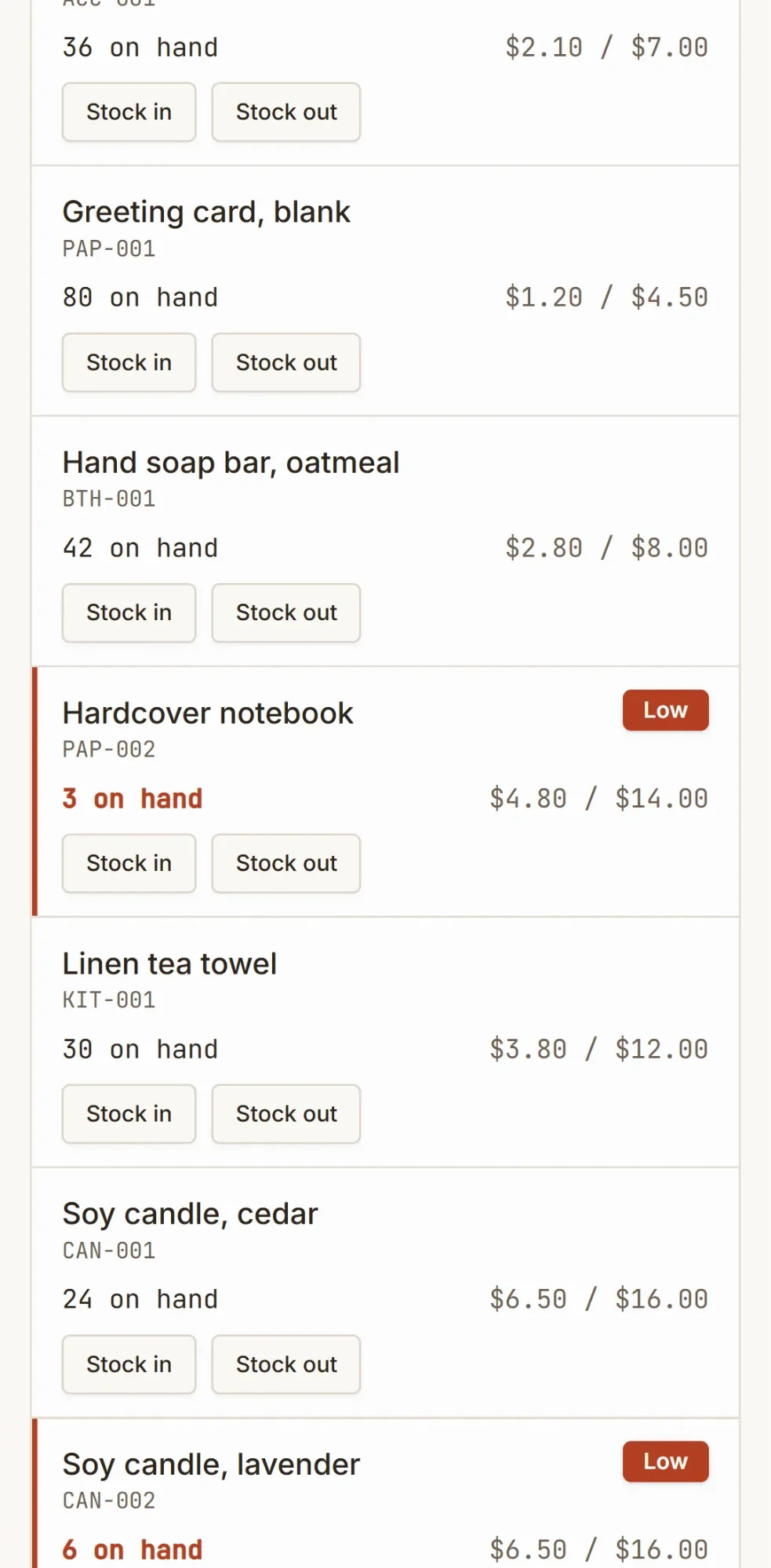
wanno built it on its own: 1 minute 44 seconds, 17 steps, and the system ran on its preview link. The main screen is visible without signing in: total value at cost ($1,124.10), value at retail ($3,156.00), a low-stock count (2) you can tap to filter the list, a search box for name or SKU, and the 12 products, each with its SKU, units on hand and cost and retail price. Low items get a "Low" tag.
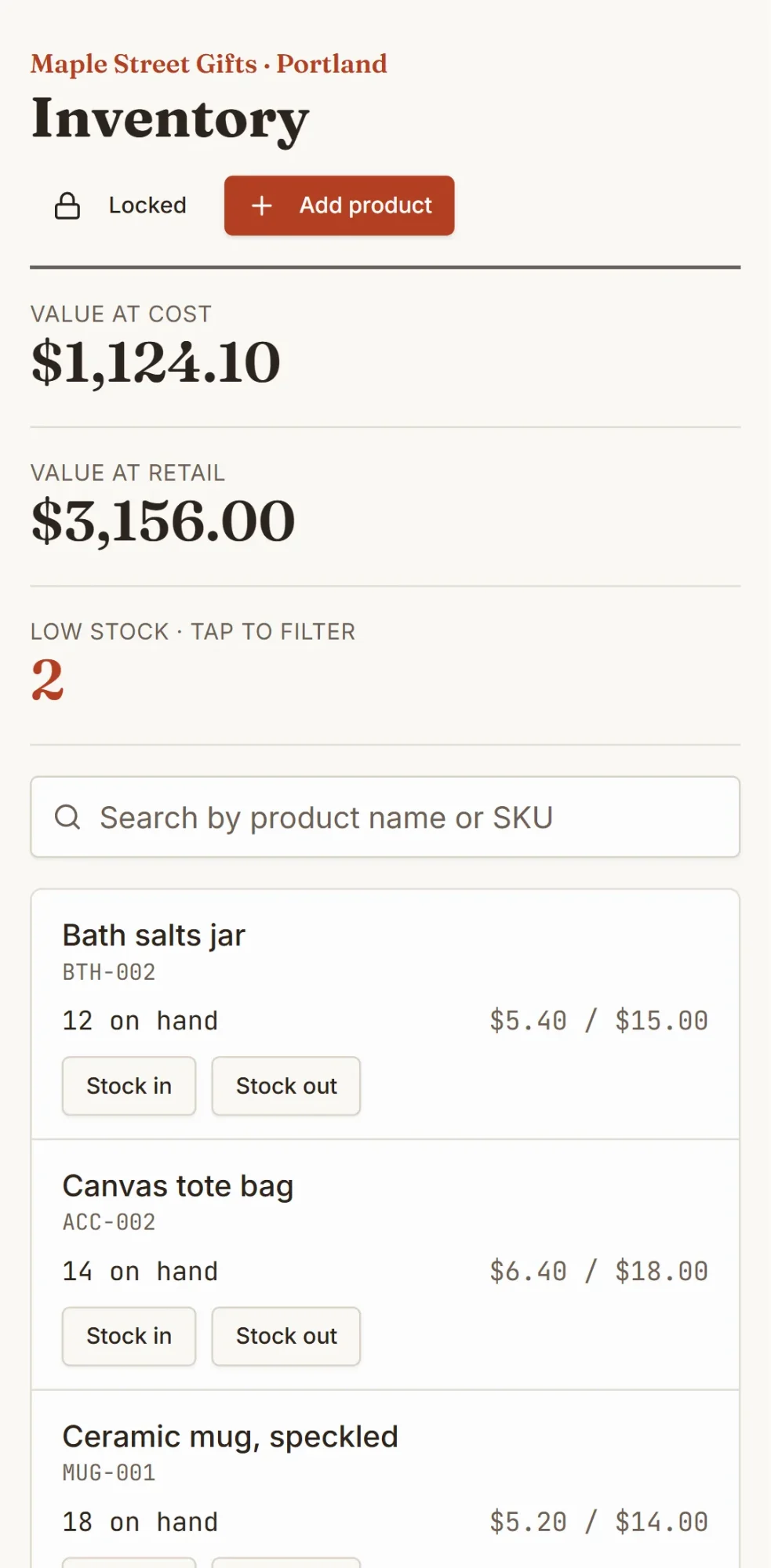
Recording changes does ask for a password. The first time, wanno shows a form to choose it; until you do, no change is saved. Stock in, stock out and adding a product all ask for it, and a stock out can't take a product below zero. Clicking a row opens its stock in and out history. Maple Street Gifts is an example business, and the products and prices are examples too. One caution: the main screen is open, so anyone with the link sees stock and prices. Share it with care.
04. How much this inventory system costs
The build cost: $0.18 in credits (1.8 credits), covered by the free credit wanno grants every day: $0.30 per day, with a monthly cap of $1.50. Using it requires no subscription.
For scale: $0.18 is paid once; the Sortly plan we use as a reference, Advanced at list price, works out to about $1.63 per day, every day. If 100 unique items are enough, start on Sortly's free plan; if you need your own fields and minimums, your own system makes more sense. With wanno you pay only to remove the badge, use your own domain or ask for more changes than the free credit covers. With your own domain and no badge, the Starter plan costs $4.99 per month with $10 of credits included (see plans).
Inventory management for small business, built around yours
To see what yours could look like, describe your inventory on wanno and look at the result; trying it is free.
Frequently asked questions
What is a reorder point? It's the stock level at which you place an order. You set it from your daily sales, your supplier's delivery time and a safety cushion.
How often should I count inventory? Count one group of products each week (best sellers or priciest first) and review the rest less often.
Can I do inventory management for free? Yes. A spreadsheet costs nothing extra, Sortly has a free plan with 100 unique items, and wanno's free plan covers building one like this guide's, which cost $0.18.
What does FIFO mean? First in, first out: you sell the items you received first. It matters most for products that expire or go out of season.
Read next: How to connect a custom domain to your site from your phone
Download wanno on the App Store · Download wanno on Google Play