A shift schedule is the weekly timetable that says who works which shift each day and who is off. This guide, written for a coffee shop, restaurant or food counter, explains what a shift schedule is, what a good one includes, how to build one with a full weekly example you can copy, and what US law says about hours and advance notice. The example schedule, for an invented coffee shop in Minneapolis, was built in wanno, a platform that builds websites and apps with AI from your phone, in 2 minutes 57 seconds and cost $0.24 with adjustments included.
In short: a shift schedule is a weekly table that assigns each team member a shift, or a day off, for every day and adds up each person's hours. A good one covers every shift with the minimum staff, gives everyone days off, keeps weekly hours under control and is shared early. In the United States, the Fair Labor Standards Act (FLSA) requires overtime pay at one and a half times the regular rate for non-exempt employees after 40 hours in a workweek, and a few cities and states add advance-notice rules for large employers.
Updated November 21, 2026.
At a glance: the four parts of a shift schedule
| Part | Question it answers |
|---|---|
| Shifts | what time does each group start and finish? |
| People | who covers each shift each day? |
| Days off | who is off, and when? |
| Hours | how many does each person add up in the week? |
01. What is a shift schedule and what is it for?
A shift schedule is a table, usually weekly, that assigns each team member the shift they work each day, or a day off. In a coffee shop or restaurant it makes sure someone is always on the bar, the register and the floor, and that everybody knows in advance when they work.
For a small business, a schedule does four jobs:
- Covers the service: every shift has the minimum people it needs.
- Shares the load fairly: weekends, closing shifts and days off are spread in plain sight.
- Controls hours: you know each person's total before the week ends, not after.
- Avoids arguments: if the schedule is written down and shared, nobody depends on memory.
The same document is also called a work schedule, roster or rota. This guide covers the team's schedule, not appointment slots for customers.
02. Types of shift schedules: fixed, rotating and split
The most common types of shift schedules are the fixed, the rotating and the split schedule. This is the usual classification of the trade, not a rule, and names vary from one business to another.
- Fixed schedule: each person always works the same shift. It is easy to remember, but closing shifts and weekends always fall on the same people.
- Rotating schedule: shifts alternate by week or every two weeks. It spreads the load better but needs the schedule published early.
- Split shift: the day is divided into two blocks with a long break in between, for example lunch and dinner.
- Opening, mid and closing: a three-shift pattern used in coffee shops. It is the one in the example.
"Swing shift" usually means the shift between the day shift and the night shift, such as an afternoon-to-evening block. It has no single legal definition, so check how your team uses it.
03. What a good shift schedule includes
A good shift schedule covers every shift, gives each person days off, adds up each person's hours and flags changes. This is the usual checklist of the trade, not a legal standard:
- Clear week and dates, Monday to Sunday.
- Each person's name and role: barista, shift lead.
- Shifts with their hours: for example opening 6 to 2, mid 10 to 6, closing 2 to 10.
- A shift or a day off in every cell, nothing blank.
- Minimum people per shift.
- Days off for everyone, every week.
- Hours per person: the weekly total at the end of each row.
- Changes announced, with the current version in plain sight.
- One place where everyone looks: a link or a printed sheet.
04. Shift schedule example you can copy
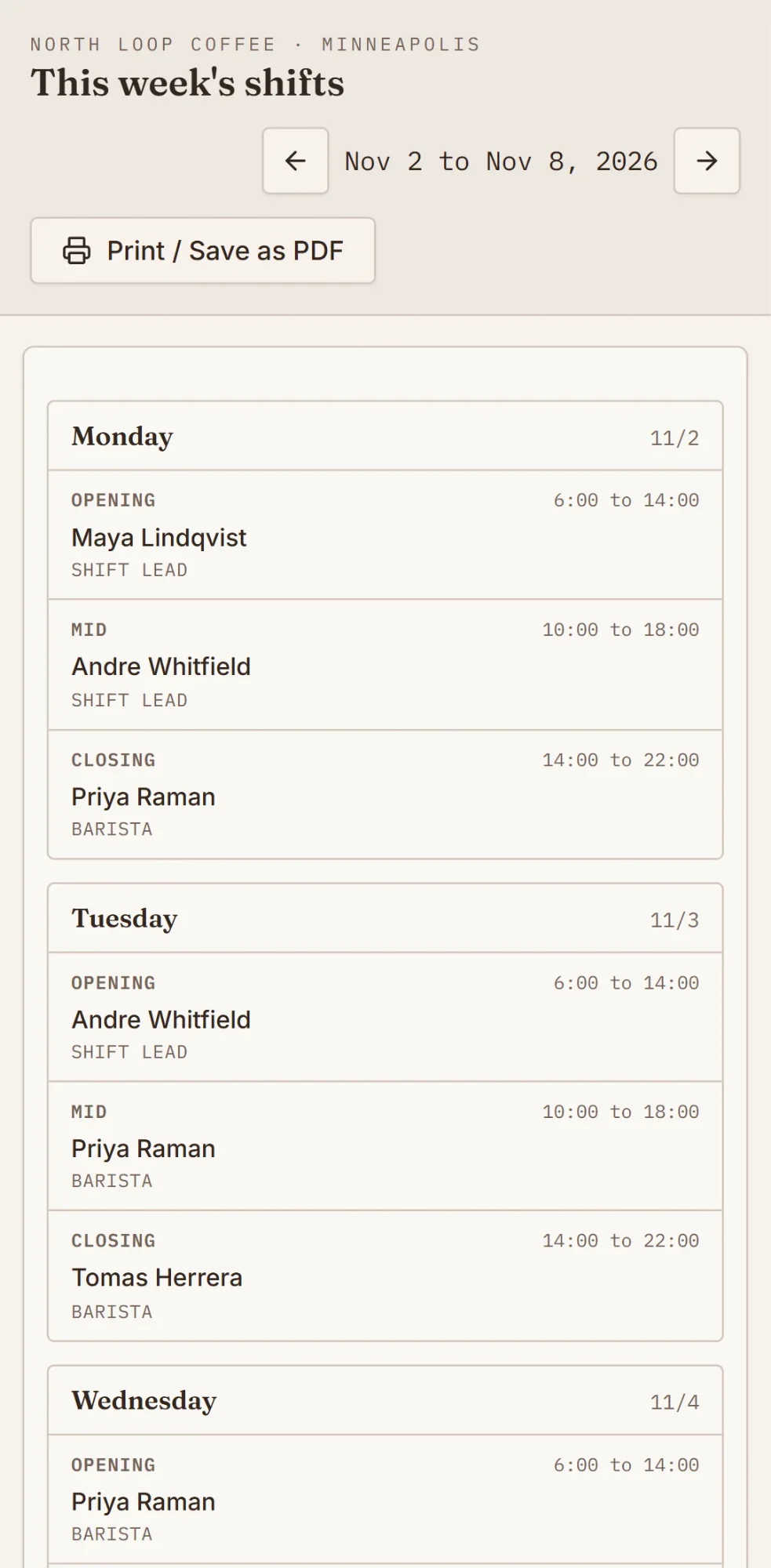
This example is a weekly shift schedule for North Loop Coffee, an invented coffee shop in Minneapolis, with six people and three shifts: Open (O) from 6 to 2, Mid (M) from 10 to 6 and Close (C) from 2 to 10. Off means a day off.
| Employee | Role | Mon | Tue | Wed | Thu | Fri | Sat | Sun | Hours |
|---|---|---|---|---|---|---|---|---|---|
| Maya | shift lead | O | Off | Off | Off | C | M | O | 32 |
| Andre | shift lead | M | O | Off | Off | Off | C | M | 32 |
| Priya | barista | C | M | O | Off | Off | Off | C | 32 |
| Tomas | barista | Off | C | M | O | Off | Off | Off | 24 |
| Grace | barista | Off | Off | C | M | O | Off | Off | 24 |
| Ben | barista | Off | Off | Off | C | M | O | Off | 24 |
Every shift lasts eight hours. The coverage rule in this example is one person per shift, three shifts every day, which is 21 shifts and 168 hours for the week. Three people work four shifts for 32 hours and three work three shifts for 24. Nobody goes over 40 hours: if Maya picked up two more shifts, she would reach 48, which is 8 hours of overtime.
To copy it, swap in your own names, roles and hours, and keep one cell per person per day. The hours are clock hours; how you handle breaks inside a shift depends on your own policy, so check it with your accountant.
05. How to make a shift schedule, step by step
To make a shift schedule, define the shifts and the minimum staff for each, assign days off first, fill in the remaining cells, check the hours and share it. Follow these steps:
- Define the shifts with their start and end times.
- Write down how many people each shift needs, by day: a Saturday needs more than a Tuesday.
- Ask early which days each person cannot work.
- Assign days off first, spread so no day is left uncovered.
- Fill in the remaining shifts.
- Check the hours in each row against the 40-hour mark.
- Check for gaps: no empty shift and nobody without a day off.
- Share the schedule with a link and keep a copy.
- Log the changes in the same schedule.
If your sales swing between days, a daily sales report shows which days need more people. Once the schedule is running, an employee attendance tracker shows whether real hours match the planned ones.
06. Common shift schedule mistakes
The most common mistakes in a shift schedule are leaving a shift empty, forgetting someone's day off, going over the hours and posting it late. They are easy to catch if you look for them before sharing:
- Empty shift: nobody assigned during service hours. Count the people per column before publishing.
- Nobody without a day off: someone with seven shifts in the week. Check that every row has its Off.
- Going over hours: a row that adds up to more than 40.
- Same people carry everything: every weekend and every closing shift.
- Changes by text: if the schedule changes in a group chat and not in the document, there are two versions.
- Posting it late: the earlier it is shared, the fewer last-minute swaps.
To see when payroll goes out, use a cash flow template.
07. The legal side: overtime and advance notice in the United States
In the United States, federal law sets overtime after 40 hours in a workweek, and a few places add advance-notice rules for large employers. These are the rules that matter most for a schedule, with their source; your state and city may add more.
- Overtime. Under 29 USC 207(a)(1), the FLSA provision on maximum hours, an employer may not employ a covered employee "for a workweek longer than forty hours unless such employee receives compensation for his employment in excess of the hours above specified at a rate not less than one and one-half times the regular rate at which he is employed". The page is on Cornell Law School's Legal Information Institute, which reproduces the US Code and is not a government site. Exemptions exist, so check whether your employees are covered.
- Oregon. According to Oregon's Bureau of Labor and Industries, an employer must give a work schedule in writing at least 14 calendar days in advance. It applies to retail, hospitality or food services employers that employ 500 or more employees worldwide.
- Seattle. According to the Seattle Office of Labor Standards, Secure Scheduling requires posting work schedules at least 14 days in advance. It covers hourly employees at retail and food services establishments with 500 or more employees worldwide, and full service restaurants must also have 40 or more full-service locations worldwide.
For a coffee shop with a few employees, these predictive scheduling rules usually do not apply, but the 14-day habit is a good practice either way. If you operate in another state or city, look up its own rules.
The demo does not calculate pay or overtime: it builds the schedule and adds up the hours.
Put it into practice: a shift schedule with a link for the team
This is the exact prompt used in wanno for North Loop Coffee:
I want an app to build the weekly shift schedule for my coffee shop in Minneapolis, North Loop Coffee: employees with their role (barista, shift lead), opening (6 to 2), mid (10 to 6) and closing (2 to 10) shifts, and a Monday to Sunday week where I tap to assign each shift. Add up each employee's hours for the week, warn me when someone goes over 40 hours or a shift has nobody, let me copy last week and print or save the schedule as PDF. Each employee sees the week's schedule on their phone with a link. Load 6 sample employees with one week filled in and save everything in the cloud. The schedule link opens without signing in and only the panel asks for a password. Everything visible in the app must be in English.
wanno built it on its own: 2 minutes 57 seconds, 72 steps and $0.24 in total, which includes adjustments to set the sample dates in November 2026 and fix punctuation in the text. It ran on its test link.
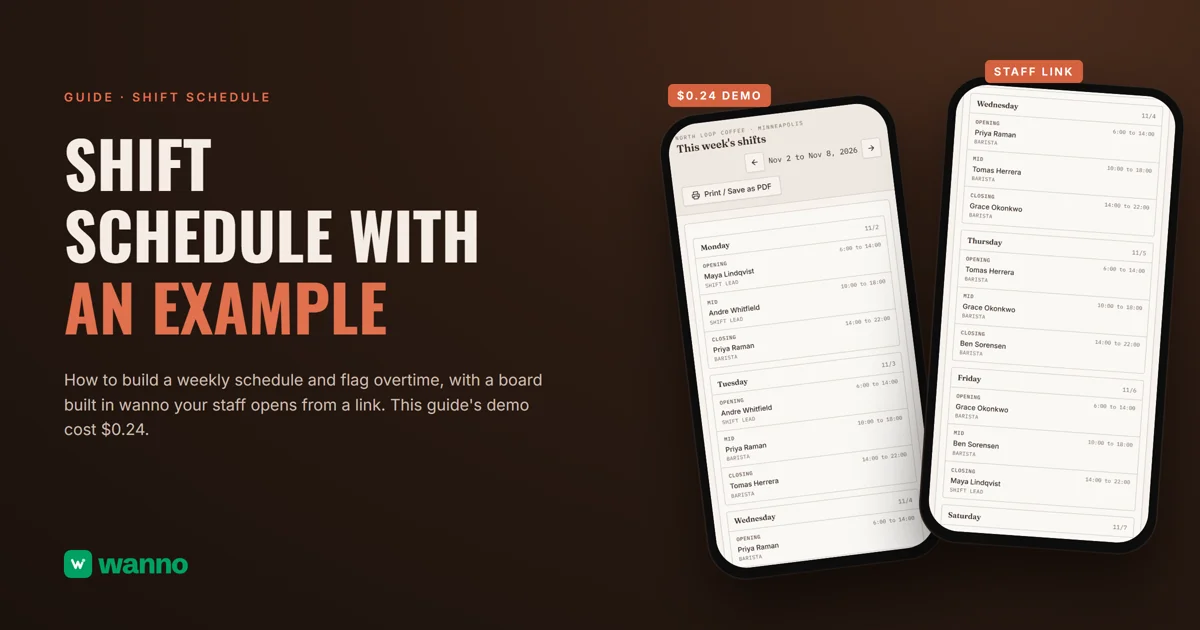
What you get is an app with a Monday to Sunday week, with Opening 6:00 to 14:00, Mid 10:00 to 18:00 and Closing 14:00 to 22:00 shifts. In the panel you tap a shift to pick who works it, and each person's hours add up on their own, with anything over 40 flagged in red. A warning strip names the employees who are over 40 hours and the shifts that have nobody.
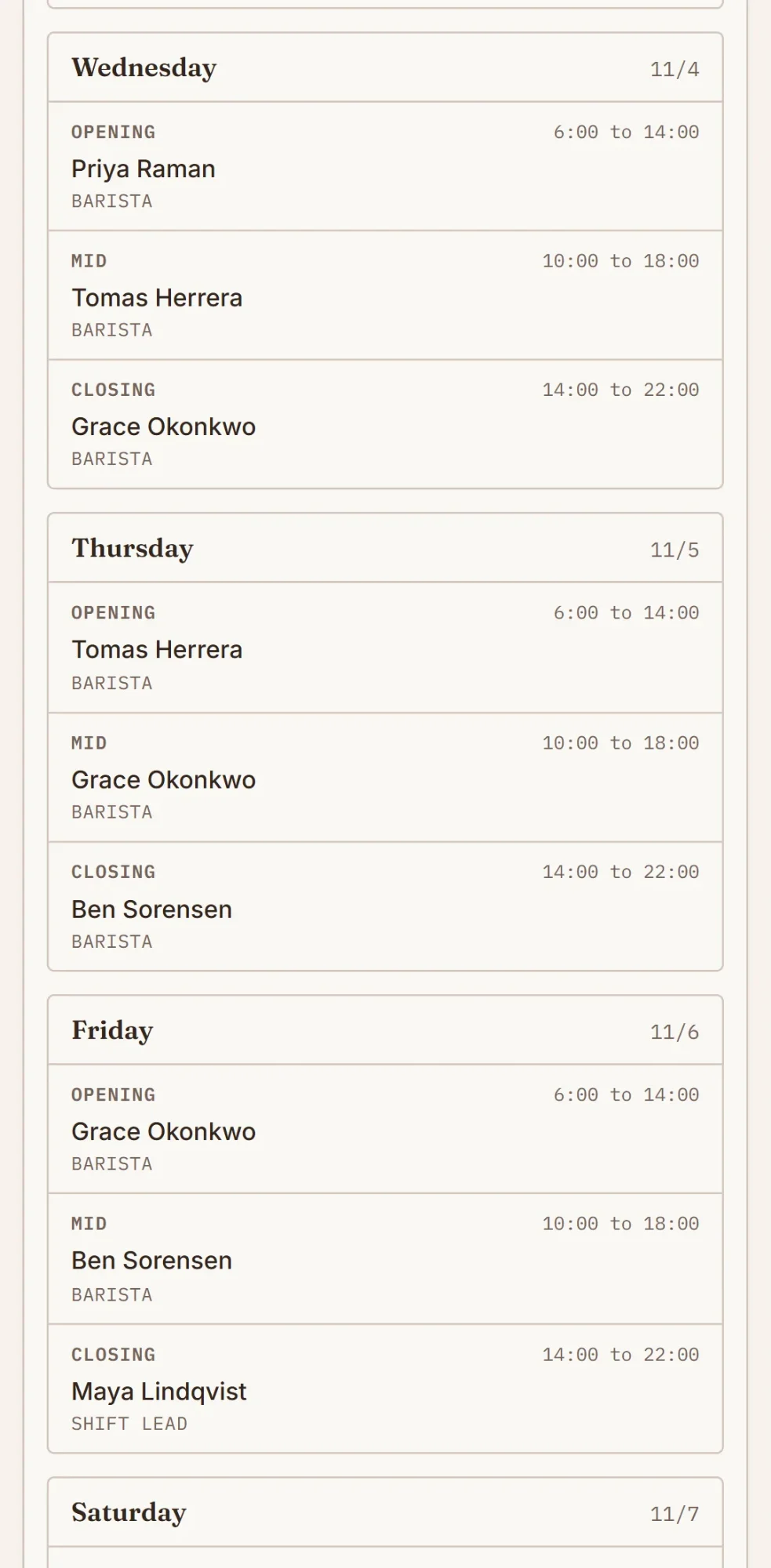
In the staff link, shown in the images on a phone, each day is a block with its three shifts and who covers them, and the weekly hours appear at the bottom with the 40-hour mark. The panel also has Copy last week and Print / Save as PDF buttons, and arrows to move between weeks. Your team opens that staff link without signing in. The owner panel, which activates when you choose your password, is where you build the schedule. One limit: this version does not add or edit employees and roles after loading. The coffee shop, the team and the hours are examples, and it is good practice to try the schedule with your own team before sharing it.
The cost: $0.24 is paid once and fits in one day of free credit. For comparison, the wanno Starter plan costs $4.99 a month with $10 in credits included, about $0.17 a day, every day (see plans).
Create your shift schedule in wanno
Describe your business, your team and your shifts in wanno, and have your first shift schedule ready to share by link.
Frequently asked questions
What is a shift schedule? A shift schedule is the table, usually weekly, that says which shift each person works each day and when they are off. In a food business it covers the kitchen, register and floor and adds up each person's hours. With wanno you can build yours and share it with your team by link.
How do you make a shift schedule? Define the shifts and how many people each needs, assign days off first, fill in the remaining cells, check each person's hours and share it. The example in this guide gives you the full weekly structure to copy.
What is a rotating shift schedule? A rotating shift schedule alternates each person's shifts by week or every two weeks, so everyone takes mornings and evenings in turn. It spreads weekends and closing shifts more evenly but needs to be posted early. It is a trade classification, not a legal term.
What is a swing shift? A swing shift is usually the shift between the day shift and the night shift, such as an afternoon-to-evening block. It has no single legal definition, so write the hours down in the schedule.
How many hours can an employee work per week? The federal overtime rule, 29 USC 207, sets no weekly maximum for adults: it requires that an employee covered by the FLSA be paid at least one and one-half times the regular rate for hours over 40 in a workweek. Exemptions and state rules vary, so check yours.
Can I make one for free?
Yes. The wanno free plan gives a daily credit of $0.30 with a monthly cap of $1.50, and the app in this guide cost $0.24, which fits in one day of free credit. On the free plan the page lives on a wanno.dev subdomain and carries the "Built with wanno" badge. You pay if you want to remove the badge, use your own domain or ask for more changes than the credit covers.
Read next: How to price a product