The short answer: a free CRM for real estate has to do five things well: keep your listings, track every lead by stage and source, schedule showings, show each client the listings that fit what they want, and tell you who needs a follow-up today. The free plans of the big CRMs cover the basics for one or two people. If you want a system shaped around how your brokerage works, you can build your own with AI: we built one for a sample four-person brokerage in Austin, and this guide shows every screen and every request. It took one detailed request, a round of fixes and about 21 minutes of the builder's work.
01. What a real estate CRM needs
A generic CRM tracks contacts and deals. A real estate CRM also has to understand properties. This is the checklist we used, based on what people ask when they search for these tools:
| Function | Why it matters |
|---|---|
| Listings with photos, price, status and agent | It's what you sell or lease, and what clients ask about |
| Leads by stage and by source | You see who is new, who toured, who is negotiating, and which channel brings real deals |
| Showings calendar | Agents live by their schedule, and every showing moves the lead forward |
| Client profile with what they want | Budget, neighborhoods, bedrooms: the basis for matching |
| Listings that match each client | The step that turns a lead into a showing |
| A public page for each listing | The link you text to a client, with a request form |
| Agent view on the phone | Agents work in the field, not at a desk |
| Reports | Leads by source, conversion by stage, results by agent |
Two decisions come before any tool. Who sees what: in our example, each agent sees only their own leads and showings, and the broker sees everything. And what counts as a closed deal: sales volume and leases are counted separately, so a $2,150 monthly lease never inflates a sales number.
02. Free CRM for real estate: the options and their limits
These are the free plans that show up when you search, with their limits as each company publishes them (checked on November 22, 2026):
| Option | Free plan | First paid step |
|---|---|---|
| HubSpot | "Free for up to 2 users" | Starter (the published price varies by region) |
| Bitrix24 | Free for 1 or 2 users, with 5 GB of storage | Basic, $49 per organization per month billed annually (5 users) |
| FreeCRM | Unlimited users and contacts, with no support | Pro, $10 per user per month |
| Trackxi | Its pricing page lists only a 14-day free trial | Essential, $39 a month or $399 a year |
| Follow Up Boss | No free plan, only a trial | Grow, $69 per user per month ($58 billed annually) |
| Build your own with AI (wanno) | $0.30 of credits a day, up to $1.50 a month, on a wanno.dev address with a wanno badge |
Starter, $4.99 a month, to use your own domain |
The pattern: most free plans cap users (HubSpot and Bitrix24 at two), the one with unlimited users drops support, and the real estate CRMs with published prices start at $39 a month. Building your own sits in between: you decide the screens, the roles and the data, and you pay for the credits used to build it, not per user. If you need a general CRM for any kind of business, our free CRM for small business guide compares the most used free plans.
03. Build your own real estate CRM in wanno, step by step
Our example is Live Oak Realty, a made-up brokerage in Austin, Texas, with sample data and AI-generated listing photos: Rachel, the owner and broker, and three agents who sell and lease houses, condos and lots in Mueller, Hyde Park, Travis Heights, Cedar Park and Round Rock. Everything below is a real screen from that build.
Step 1: write one complete request
The most useful lesson from our tests: describe the whole system in one request, with the decisions already made. This is the request we used, unchanged:
I run a small real estate brokerage in Austin, Texas: Live Oak Realty. It's me (Rachel, the owner and broker) and 3 agents (Marcus, Priya and Danny). We sell and lease houses, condos and lots in Mueller, Hyde Park, Travis Heights, Cedar Park and Round Rock. Today everything lives in spreadsheets and text messages, and we lose leads.
I want a CRM for the brokerage with these parts:
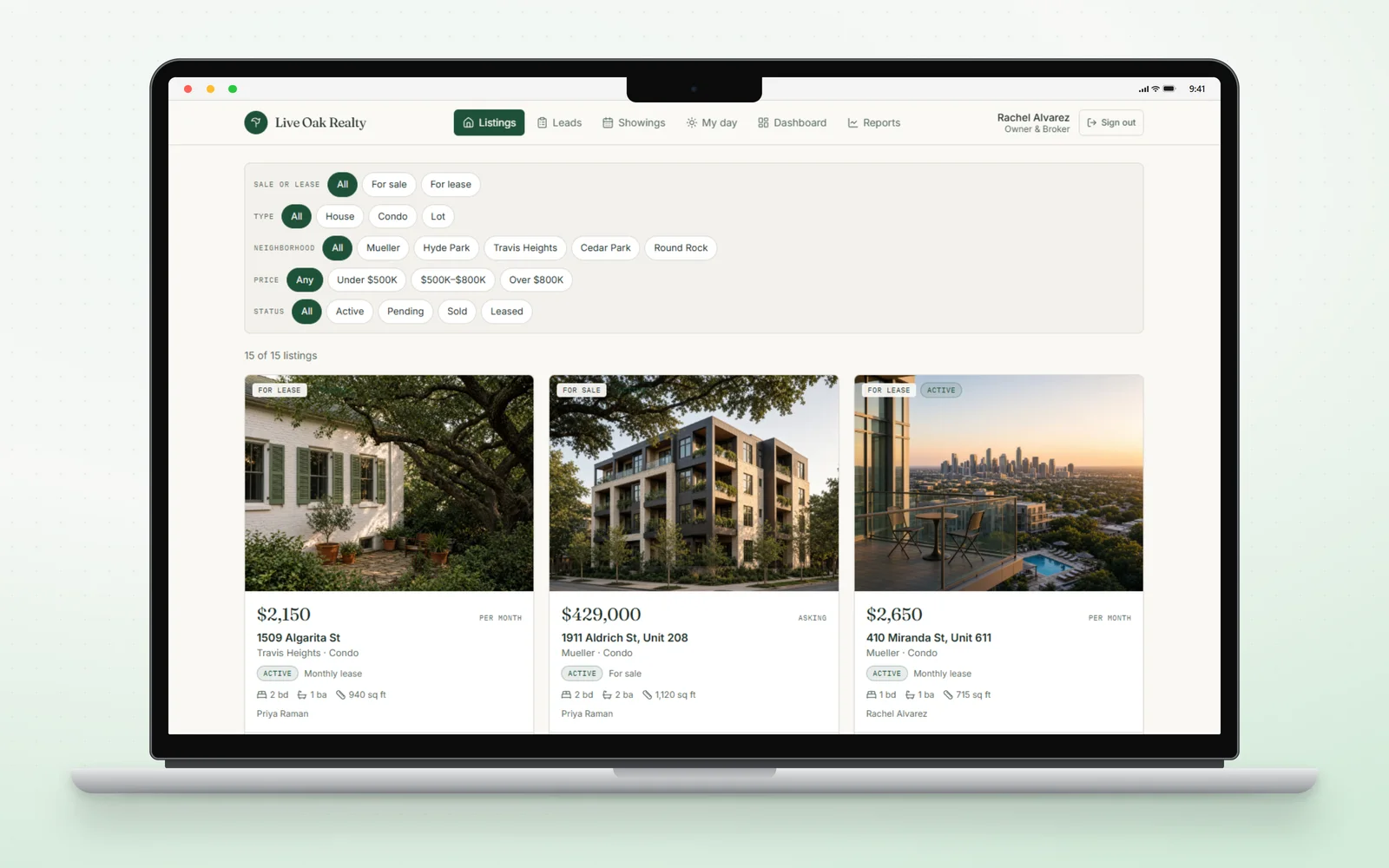
- Listings: photo gallery, title, street address (its own field), neighborhood, sale or lease, type, price, bedrooms, bathrooms, square feet, lot size, status (active, pending, sold or leased) and the agent in charge. Filters by sale or lease, type, neighborhood, price and status.
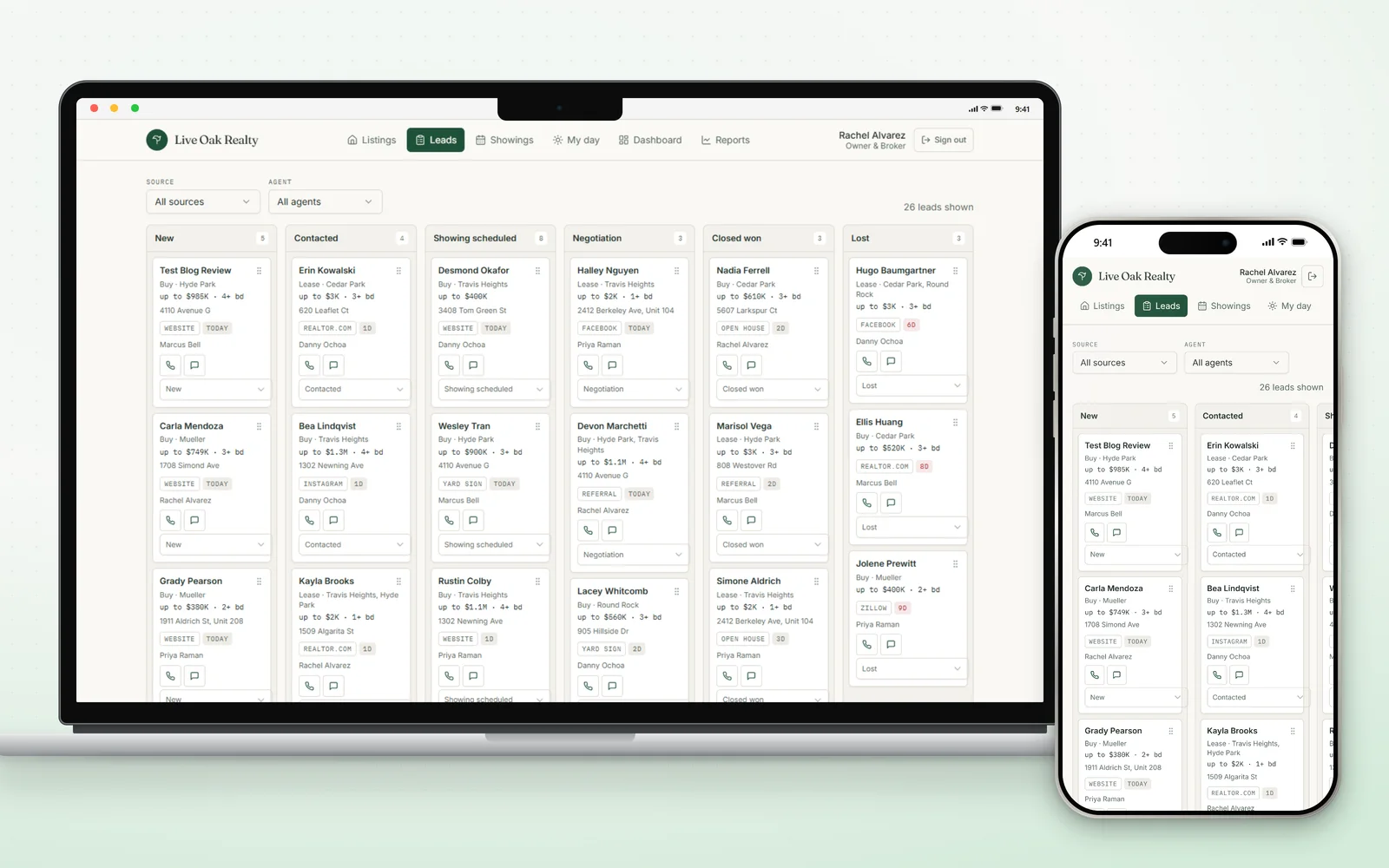
- Leads on a board by stage: New, Contacted, Showing scheduled, Negotiation, Closed won and Lost. For each lead save separately what they want: buy or lease, property type, neighborhoods, max budget and minimum bedrooms. Also the source (Zillow, Realtor.com, Facebook, Instagram, website, referral, yard sign or open house), the agent and how many days since the last contact. Drag between stages and filter by source and agent.
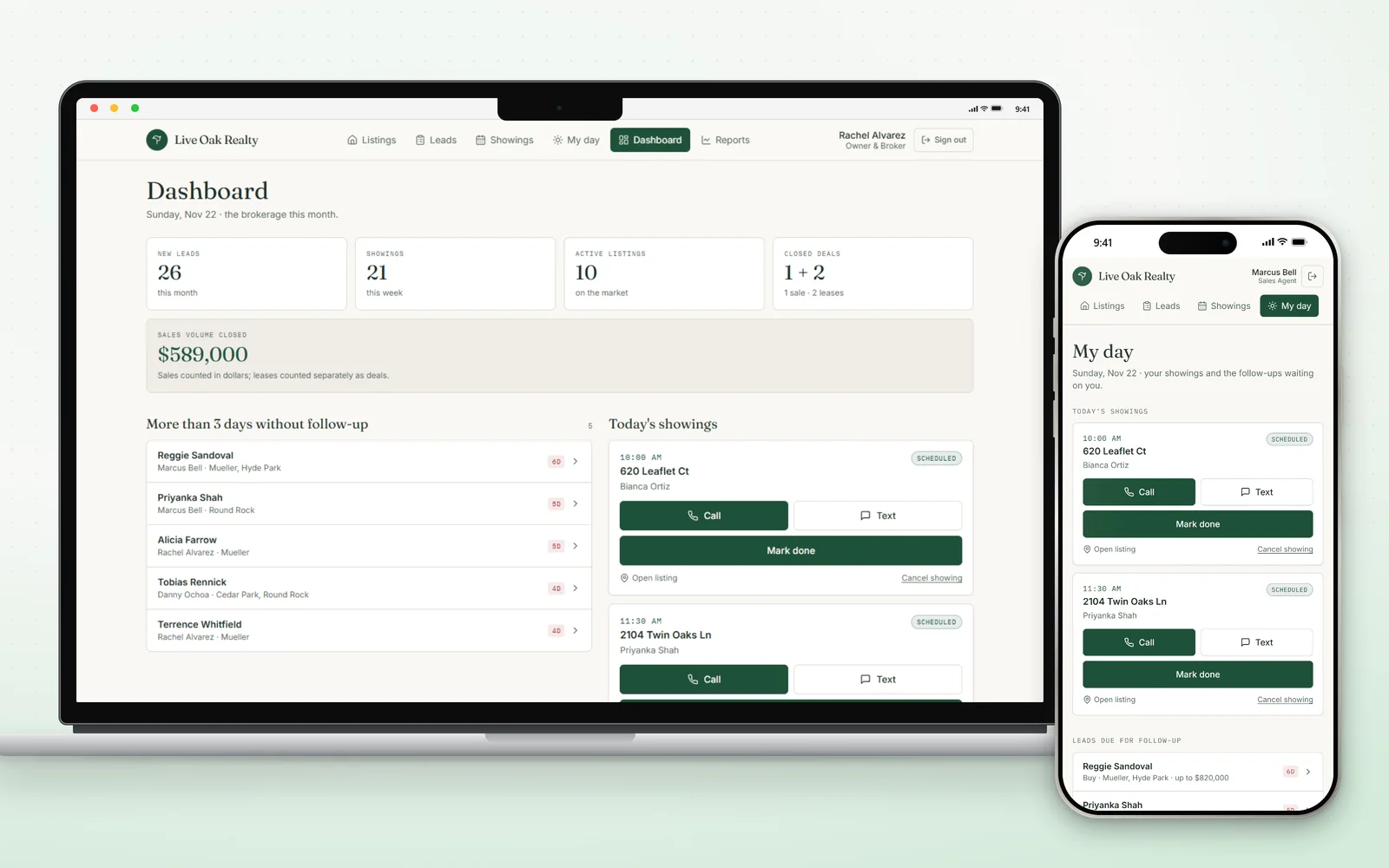
- Dashboard for me: this month's numbers (new leads, showings this week, active listings, closed deals with sales volume and leases counted separately) and the leads with more than 3 days without follow-up.
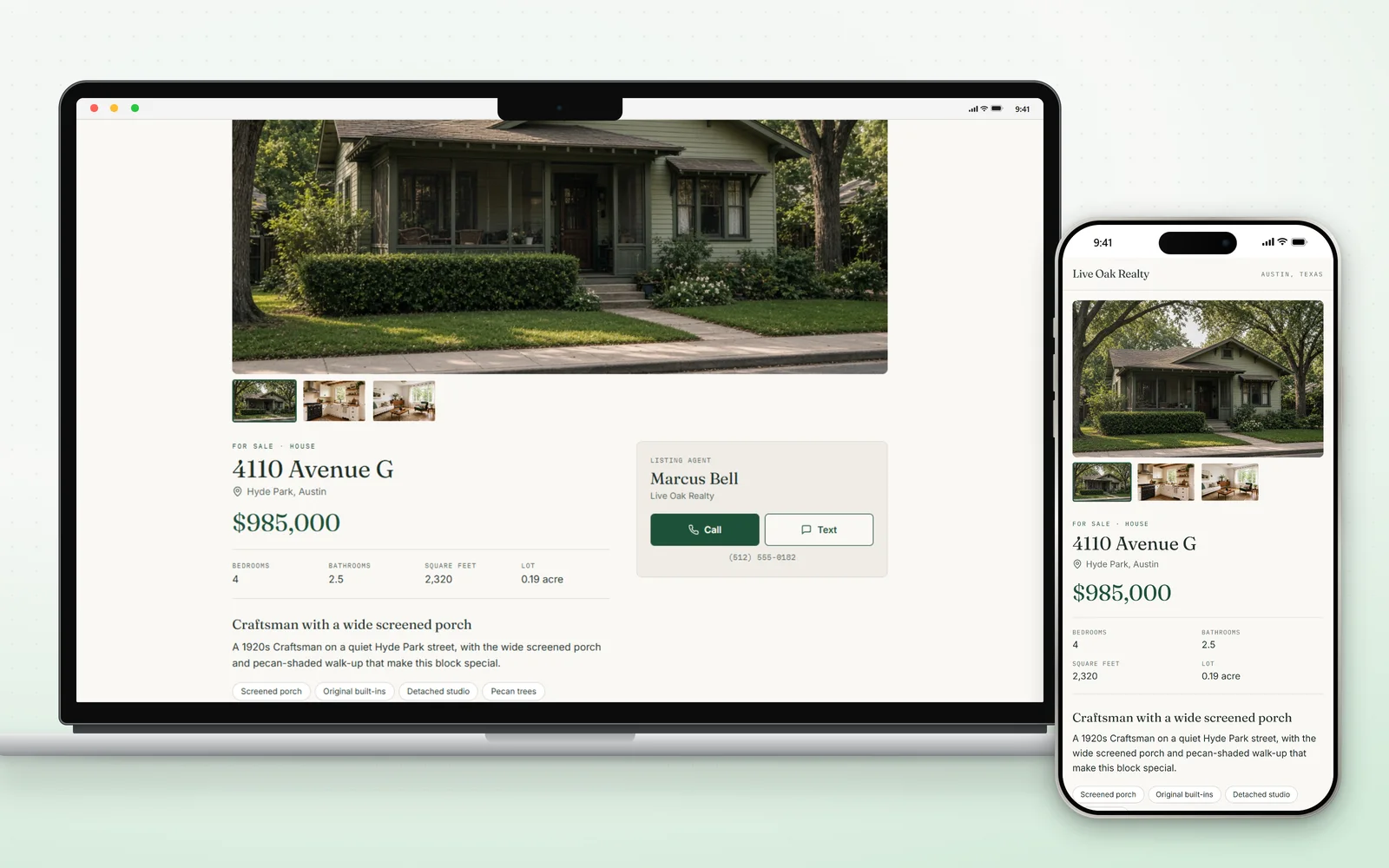
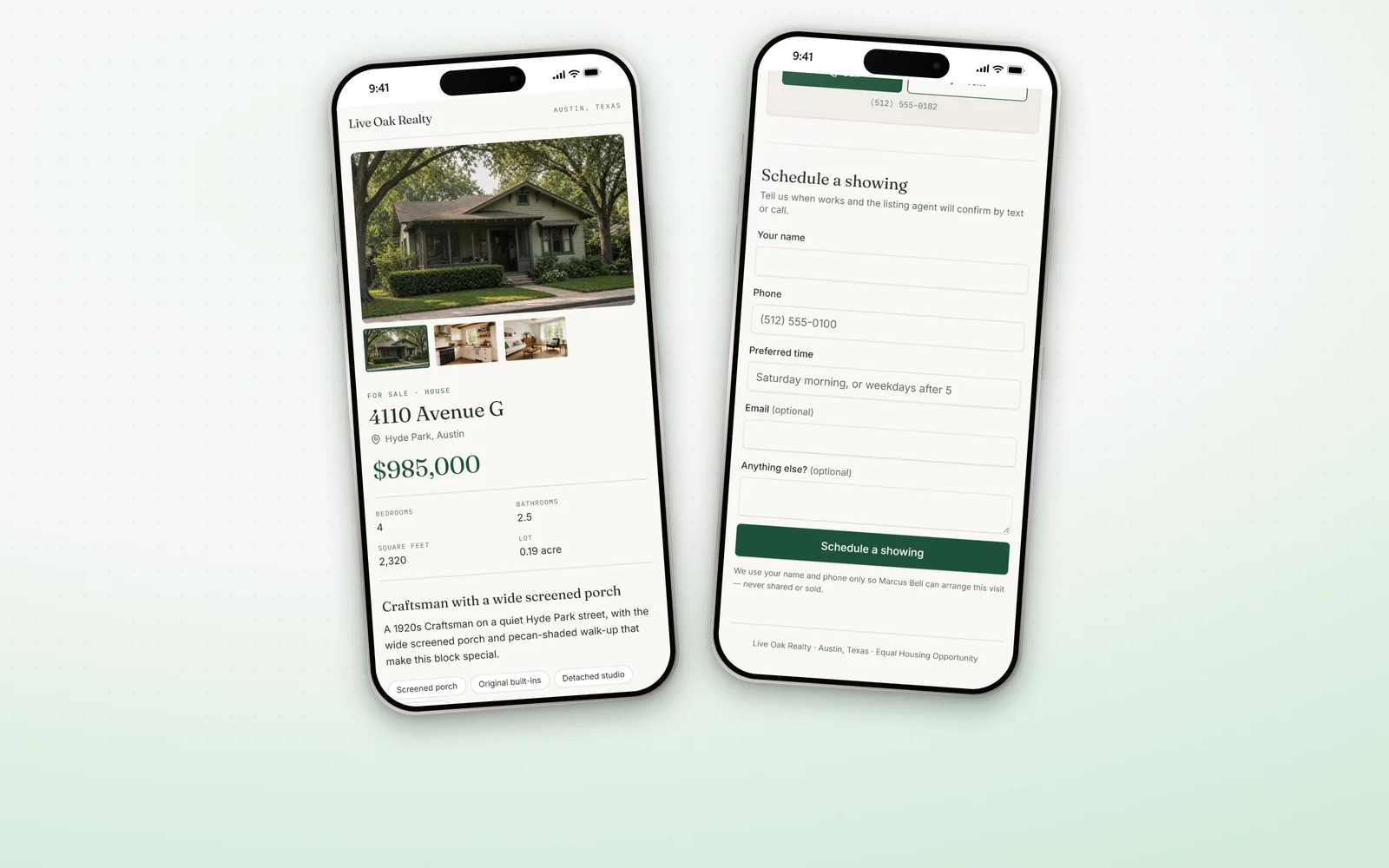
- A public page for each listing that I can text to clients: photos, price, features, neighborhood and the agent with a text/call button. Nothing internal on it. When the link is pasted in a message, the preview must show the listing name, price and photo. Below, a "Schedule a showing" form (name, phone, preferred time) with a one-line privacy note; each request goes into the board as a New lead with source "website", linked to that listing and assigned to its agent.
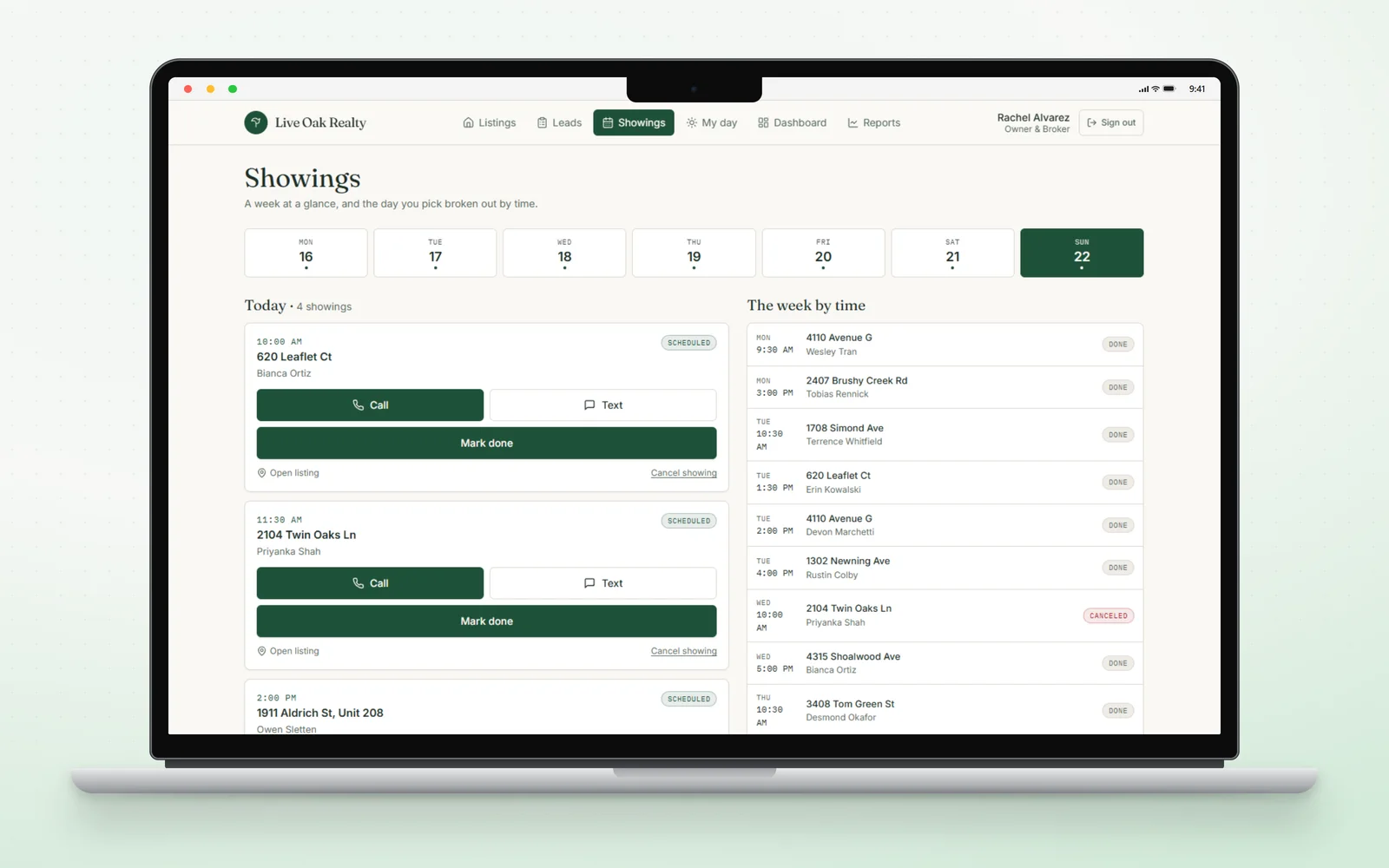
- Showings calendar: week view and today's list. Each showing has date and time, listing, client, agent and status (scheduled, done, canceled). After a showing the agent marks it done and leaves a quick note. Scheduling a showing moves the lead to "Showing scheduled".
- Client profile: contact info, what they want, source, stage, full history of calls, texts and showings, a button to log a new contact, and "Listings that may interest them": only active listings that match the operation, type, neighborhood, minimum bedrooms and a budget up to 10% above their max.
- "My day" for agents, made for the phone: today's showings by time with the address and big call and text buttons, a big "Mark done" button with a quick note, and below, their leads due for follow-up.
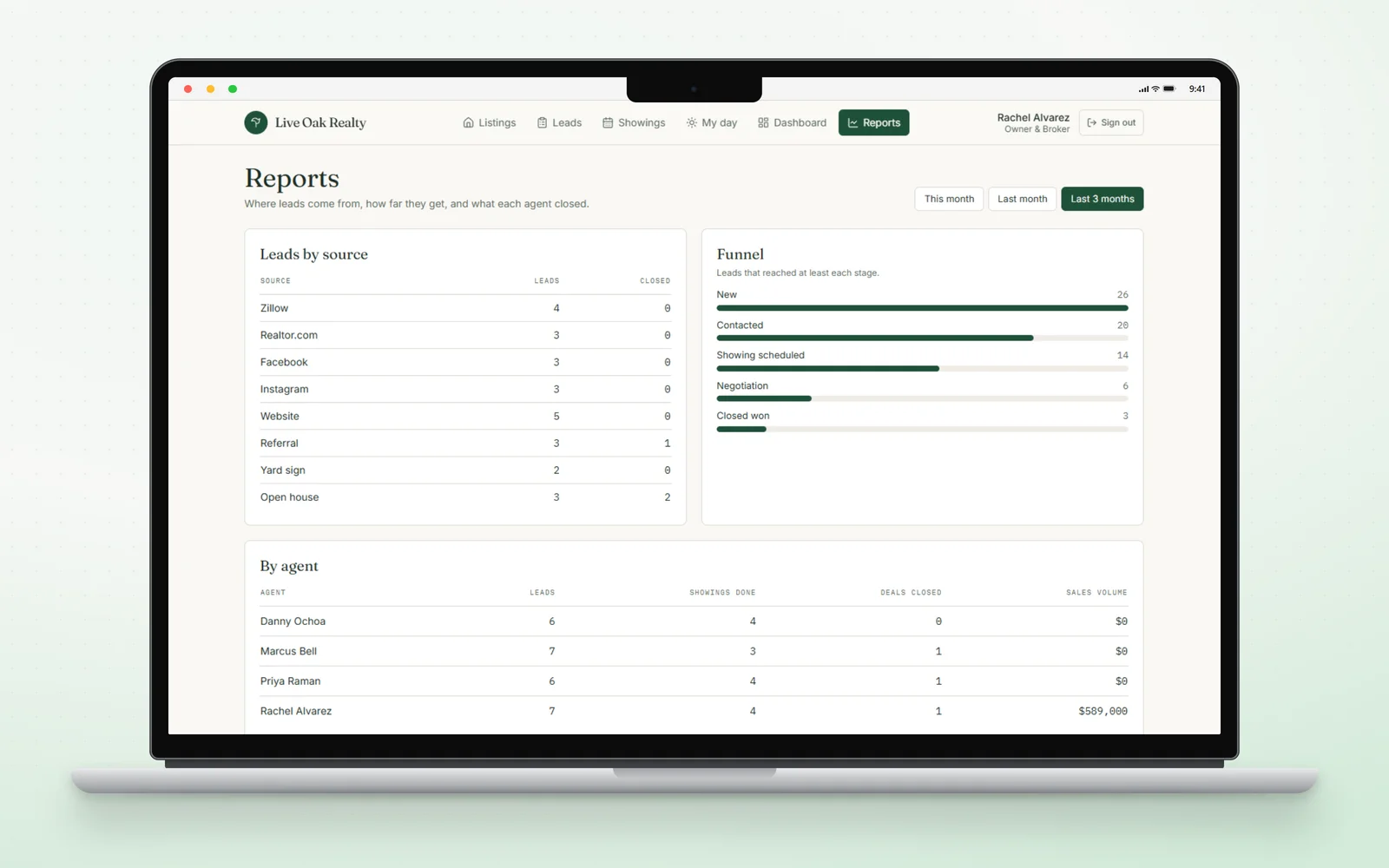
- Reports for me only: leads by source and how many closed, the funnel counting how many leads reached at least each stage, and per agent: leads, showings done, deals closed and sales volume. Period selector (this month, last month, last 3 months).
Roles: each agent sees only their own leads and showings; I see everything. Each person signs in with their own access code. Do not show the codes on the sign-in screen: tell me in the chat.
Sample data so it looks alive: 15 listings with their own different photo each (no repeats; a 3-photo gallery on the first 5), 25 leads across all stages and 20 showings between last week and this week. Prices in US dollars like $485,000, square feet, US dates, and Austin time (Central). Business hours only, and nothing in the future except scheduled showings. Leave 3 or 4 leads with more than 3 days without contact. Data must be saved in the cloud because the 4 of us use it from different phones and computers.
Important: never delete or change records that users entered (for example a showing request from the public page), and never add code that changes stored dates or data when the server starts. Before you say it's done, open every screen and check that it actually displays and that every photo loads.
Everything visible in the app must be in English.
Why each detail is there: the separate fields for what a lead wants (buy or lease, type, neighborhoods, budget, bedrooms) are what make matching possible. If you write "what they're looking for" as free text, the system can only guess. The time zone and "nothing in the future" keep the sample showings at sensible hours. The roles line decides the security model before the first screen exists. The last line didn't stop the builder from saying it was done too early (see step 8), so keep it, but check the screens yourself.
Step 2: the listings
Each listing has its own photo, a gallery on the first five, the street address as its own field, status and agent. The filters cover sale or lease, type, neighborhood, price and status, and every card has a button to copy its client link.
Step 3: the leads board
Six stages, one card per lead with what they want, budget, source, agent and days since the last contact. The request asked for drag and drop between stages; every card also has its own stage menu, on the phone too. The first card under New, "Test Blog Review", is the test request we sent from the public page; "Carla Mendoza" is one the builder sent while testing its own form. What to check: move a card, reload the page and make sure it stayed in its new stage.
Step 4: the client profile and the matches
This is the screen that pays for the whole system. Devon Marchetti wants to buy a house in Hyde Park or Travis Heights, with at least 4 bedrooms and a budget of $1,050,000. The CRM shows only the active listing that fits all of that, and logs every call and text in the history.
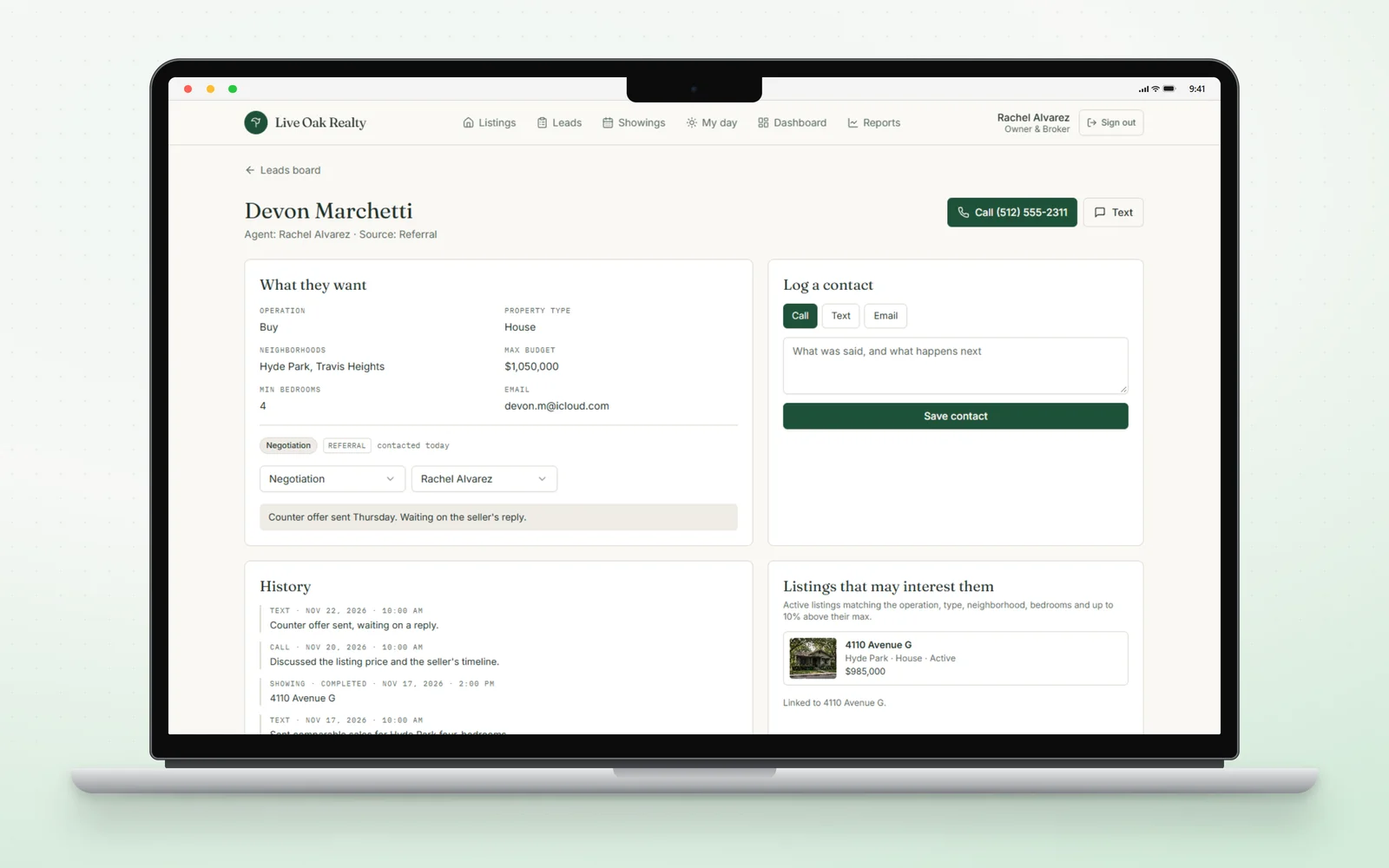
Test this screen with two or three clients before you trust it: if a match ignores the budget or the type, ask for the fix in plain words ("matches must respect sale or lease, type, neighborhood, bedrooms and budget").
Step 5: showings and the agent's day
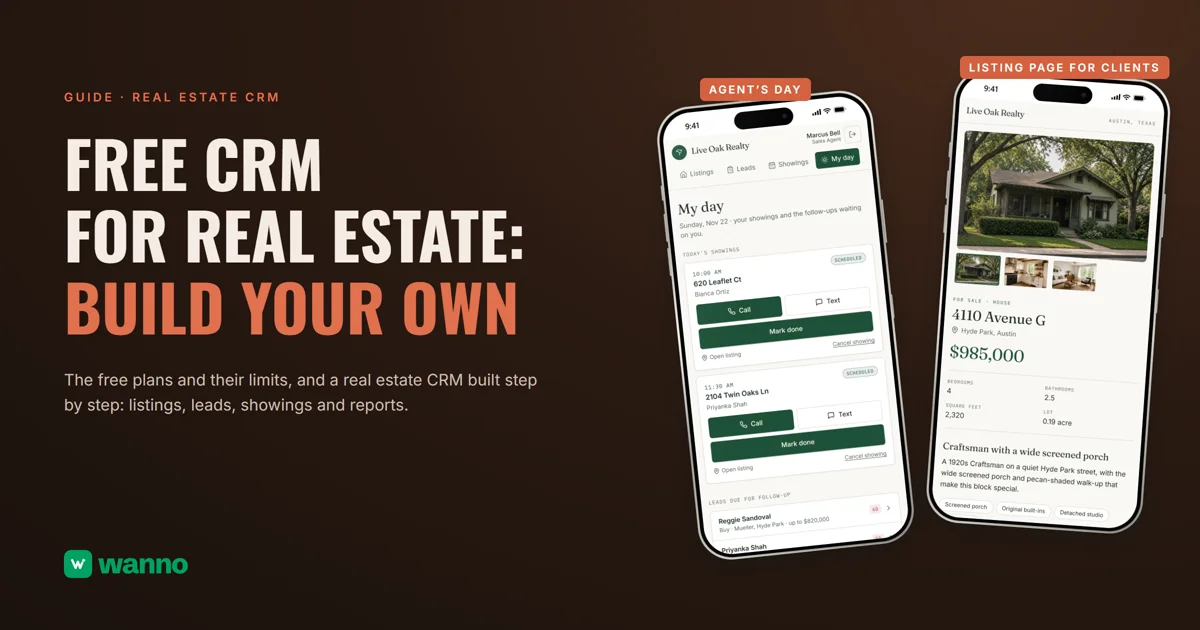
The calendar shows the week and today's list. On the phone, each agent opens "My day" (the phone in the first image): today's showings by time, with the address, big call and text buttons and a "Mark done" button (the request asked for a quick note with it).
Step 6: reports for the owner
Leads by source and how many closed, the funnel by stage and results by agent, for this month, last month or the last three months. Only the broker sees this screen: we signed in as one of the agents, and the Reports tab isn't there.
Step 7: the public page you text to clients
Each listing has a page that opens without signing in, with photos, price, features and the agent's call and text buttons. Further down, the "Schedule a showing" form sends the request straight to the board as a new lead, linked to that listing and assigned to its agent: we sent a test request and it landed on the agent's board. The page also has its own title, description and image for when you share the link, instead of the CRM's description.
Publish the app before you text that link: the test link goes to sleep when nobody uses it and can change address.
Step 8: check it like a client would
Before you share anything, open each screen on your phone and on a computer, and send yourself a test request from the public page. In our build, the builder said everything was ready when it wasn't: first the whole app didn't open, then the public listing page stayed blank. The app came back with one request. The public page took four more, and the last two worked only after we pasted the error the browser showed in its console. Seven of its 15 answers stopped halfway: six needed a "continue" and one a new request. The last three requests were only for details you could see on screen: the listing label read "FOR FOR SALE", every entry in a client's history showed the same time, the reports funnel left out the lost leads, condos showed a lot size, some cards had no status, a client looking for a lease had a showing at a house for sale, and some leads with a finished showing hadn't moved forward. So check every screen yourself, especially the public page.
Building it, including those fixes, cost $2.12 in wanno credits (21.2 credits, as itemized per answer). That's what it cost to build, not a monthly fee like the plans in the table: credits are used while wanno works, and every change you ask for later uses credits too. It's more than a full month of the free plan ($1.50); the Starter plan ($4.99 a month) includes $10 in credits.
04. When to build your own and when to buy one
Buy a ready-made real estate CRM if you need what only an established product brings: automatic syndication to listing portals, integrations with your MLS or transaction tools, a phone dialer, or a support team behind the product.
Build your own if your workflow is simple and specific: a small team, your own neighborhoods, your own stages and the screens your agents actually use, without paying per seat for features you won't touch. You can start small and add a screen at a time, each one a request in plain words.
Whichever you choose, the checklist in section 01 is the test: if a tool can't show each client the listings that fit them and tell each agent what to do today, it isn't a real estate CRM yet. That's the part we put at the center of the one we built in wanno. Describe yours in wanno and see what you get.
How to connect your own domain to your wanno app
Your app goes live on a free address like your-business.wanno.dev. To open it at yourbusiness.com, you can connect a domain you already own or buy one without leaving wanno. You'll find the full walkthrough, with every screen, in our guide on how to connect a custom domain to your site from your phone. The short version:
- Publish the app and click the Published button at the top.
- Under Your own domain, click Add. In the app, custom domains come with a paid plan; the cheapest that includes one is Starter, at $4.99 a month. Connecting the domain costs nothing extra in wanno: you pay for the domain itself to whoever sells it to you (see plans).
- Choose between buying a new domain and connecting the one you already have. wanno uses Entri to connect it: according to Entri's documentation, it detects your domain provider and, if it's supported, adds the records for you after you sign in; if not, it shows the records to add by hand.
- If you add the records yourself, do it in your provider's dashboard, for example in GoDaddy's Domain Portfolio, and copy them exactly as shown.
- Wait for the change to take effect: GoDaddy says it can take up to 48 hours, usually less. Meanwhile your app keeps working on its
.wanno.devaddress.
Frequently asked questions
Is there a 100% free real estate CRM?
On wanno, the free plan gives you $0.30 of credits a day, up to $1.50 a month, and keeps the app on a wanno.dev address with a wanno badge. The first answer of our build alone used $0.35 of credits, more than one free day, and the full CRM cost $2.12, more than a month of free credits, so a build this size needs extra credits. The free CRM for real estate you build that way is yours to shape: your stages, your neighborhoods, your screens.
Can ChatGPT make a CRM? ChatGPT can explain how a CRM works or write the code for one, but you still have to run it, store the data and keep it online. An AI app builder like wanno does all of that: you describe the CRM in plain words and get a working app with its own database, sign-in and public pages.
What CRM do most real estate agents use? We found no public data on which CRM most agents use. Small teams usually start on a generic CRM with a free plan, and larger brokerages pay for real estate CRMs with more integrations. The right one is the one your agents open every day, which is why the CRM we built in wanno gives each agent a "My day" screen on the phone.
How long does it take to build a real estate CRM with AI? Our build took one detailed request, eight fix requests and six "continue" messages: about 21 minutes of the builder's work in total. By the clock, the internal CRM worked after about 30 minutes; the public listing page needed more fix requests later on. Most of the work is deciding what you need, which is why section 01 comes first.
Keep reading: Landing page for a local business
Download wanno on the App Store · Download wanno on Google Play