A daily sales report is the record of every sale a small business makes in a day, with the items sold, quantities, prices and payment method, totaled at close so you know what came in and whether the cash drawer matches. This guide explains what to log, how to build a daily sales report with a complete example you can copy, when a spreadsheet is enough and when an app is better, and what the IRS says about keeping sales records. The example app, for an invented food truck in San Diego, was built in wanno, a platform that builds websites and apps with AI from your phone, in 7 minutes 19 seconds and cost $1.02 with adjustments included.
In short: a daily sales report lists each sale of the day (item, quantity, price and payment method) and adds them up by payment type. At close, a cash count compares the cash that should be in the drawer with the cash you counted. It is an internal record, not a tax filing: the IRS, in Publication 583, lists a daily summary of cash receipts as part of a simple recordkeeping system for a small business.
Updated November 21, 2026.
At a glance: what each part of the report tells you
| Part | What it answers |
|---|---|
| Line for each sale | what sold, how many and how it was paid |
| Daily, weekly and monthly totals | how much is coming in and which way it is moving |
| Sales by payment method | how much was cash, card or mobile payment |
| Cash count | whether counted cash matches expected cash |
01. What is a daily sales report and what is it for?
A daily sales report is a one-day summary of a business's sales, built from the individual sales rung up that day. For a food truck, a coffee shop, a boutique or any counter business, it does four jobs:
- Shows what came in: one number for today, one for the week and one for the month, with no guessing at the end.
- Shows what sells: which items move and which sit.
- Balances the drawer: it compares expected cash with counted cash, so a shortage shows up the same day.
- Backs up your taxes: it gives you the numbers when your accountant or the IRS asks for them.
Do not confuse it with the sales pipeline reports of CRM software, which track leads and deals. This one lives at the counter and answers a simpler question: what did we ring up today?
02. What to log for each sale
Each sale needs only a few fields, but they should always be there. This is the usual checklist of the trade, not a legal standard:
- Date and time of the sale.
- Item or items sold.
- Quantity of each item.
- Unit price at the time of sale, since prices change.
- Line amount (quantity times unit price).
- Sale total.
- Payment method: cash, card or mobile payment.
- Who rang it up, if more than one person works the counter.
- Receipt or ticket number, if you use one.
- Optional note: a special order, a discount you agreed to, a customer who asked for an invoice.
Every report you need comes out of those ten fields. Start with them and add something only if you will read it again.
03. Complete daily sales report example to copy
This example is one day at an invented food truck, with ten sales, totals by payment method and a cash count. The items and amounts are made up and are not the menu of the demo.
Taco Tide food truck, San Diego. Date: November 13, 2026.
| # | Item | Qty | Unit price | Amount | Payment |
|---|---|---|---|---|---|
| 1 | Carne asada taco | 3 | $4.00 | $12.00 | Cash |
| 2 | Fish taco | 2 | $4.50 | $9.00 | Card |
| 3 | Shrimp burrito | 1 | $12.00 | $12.00 | Mobile |
| 4 | Chips and guacamole | 1 | $6.00 | $6.00 | Cash |
| 5 | Horchata | 2 | $3.50 | $7.00 | Cash |
| 6 | Carne asada taco | 4 | $4.00 | $16.00 | Card |
| 7 | Fish taco | 3 | $4.50 | $13.50 | Mobile |
| 8 | Shrimp burrito | 2 | $12.00 | $24.00 | Card |
| 9 | Elote | 2 | $5.00 | $10.00 | Cash |
| 10 | Horchata | 1 | $3.50 | $3.50 | Cash |
| Total for the day | $113.00 |
And this is the close of the day:
| Payment method | Sales | Total |
|---|---|---|
| Cash | 5 | $38.50 |
| Card | 3 | $49.00 |
| Mobile | 2 | $25.50 |
| Total for the day | 10 | $113.00 |
Cash count: opening cash float $100.00, plus cash sales $38.50, equals $138.50 that should be in the drawer. Counted cash: $138.00. Difference: short by $0.50, which you write down and look into the next day (a wrong change, for example).
To copy it, swap in your own items and prices and keep the same columns. The math is direct: each amount is quantity times unit price, the day's total adds the amounts, and expected cash is the opening float plus cash sales. Card and mobile payments never touch the drawer: you reconcile them against your processor or bank statement.
04. How to make a daily sales report step by step
To make a daily sales report, set up your menu with prices, log each sale as you ring it up, total the day by payment method and count the cash. Here are the steps:
- Set up your menu with each item and its current price.
- Pick where to log: a spreadsheet, a notebook or an app on your phone.
- Log each sale as you ring it up, not at the end of the day: that is when you remember it best.
- Record the payment method for every sale.
- At close, total the day and split it by payment method.
- Do the cash count: count the drawer and compare it with the expected cash.
- Write down the difference and its likely cause.
- Save the closed day and do not edit it: if there was a mistake, fix it with a note.
- Review the week to see which item is rising and which is falling.
If you sell items with limited stock, connect the report to inventory management: today's sales are tomorrow's reorders.
05. Spreadsheet or app: which one fits
A spreadsheet is enough to start, and an app fits better when you sell from your phone or serve people several times an hour. Here is the comparison without the sales pitch:
| Notebook | Spreadsheet (Excel) | App on your phone | |
|---|---|---|---|
| Cost | almost nothing | free or already owned | free or low cost |
| Speed at the counter | slow | medium (you type) | fast (you tap the item) |
| Totals and comparisons | by hand | formulas you build | automatic |
| Cash count | by hand | formulas | automatic |
| Common errors | bad addition | broken formulas | the wrong price loaded |
| Best when | few sales a day | one computer | you sell standing up or on the phone |
A spreadsheet breaks down when two people edit it at once or when a formula breaks and no one notices. An app breaks down when the menu is out of date. Either one works if you log every sale, every day.
06. How to read your daily sales report
To read your daily sales report, look at three things: this week against last week, your top sellers and the mix of payment methods. Here is an example with round numbers:
- Week over week: last week you sold $3,150.00 and this week $3,402.00. The difference is $252.00, which is 8% more.
- Top sellers: if three items bring in half your sales, make sure they never run out.
- Payment mix: in the example above, card was $49.00 of $113.00. If you pay a fee to accept cards, that number tells you what it costs.
When you change a price, check your price list and watch whether that item's sales move the following week. And to see how sales turn into money you can spend, month by month, a cash flow template shows when money comes in and when it goes out.
07. The legal side: what the IRS says about sales records
In the United States, we found no IRS template for a small business's daily sales report, but the IRS asks you to keep records that support your income. According to IRS Publication 583, gross receipts are the income you receive from your business, and you should keep supporting documents that show the amounts and sources of your gross receipts, such as cash register tapes, bank deposit slips, receipt books, invoices and credit card charge slips. The same publication says a simple recordkeeping system for a small business can include a daily summary of cash receipts and monthly summaries of cash receipts and disbursements, which is what this report is.
How long to keep them depends on your situation. The IRS says to keep records for 3 years in the usual case, 6 years if you do not report income that you should report and it is more than 25% of the gross income shown on your return, and 7 years if you file a claim for a loss from worthless securities or a bad debt deduction. If you do not file a return, it says to keep them indefinitely. Sales tax rules vary by state and are not covered here: check with your state or your accountant.
The demo, for its part, is an internal tool: it logs sales, totals them and counts cash. It does not file taxes or issue invoices.
Put it into practice: a daily sales report app with a cash count
This is the exact prompt used in wanno for Taco Tide:
I want a sales tracker for my food truck in San Diego, Taco Tide: log each sale fast from my phone by tapping items from my menu with their price in US dollars, the quantity and the payment method (cash, card or mobile payment). Show today's total, this week's and this month's totals, sales by payment method, the 5 best-selling items and this week compared with last week, plus an end-of-day cash count with how much cash should be in the drawer. There is a panel to edit the menu and see the history. Load 10 sample menu items and two weeks of sales and save everything in the cloud. Everything asks for a password. Everything visible in the app must be in English.
wanno built it on its own: 7 minutes 19 seconds, 175 steps and $1.02 in total, which includes adjustments to add the Daily sales report view, move the sample sales to November 7 to 20, 2026 with US date format, spread them through the day, fix the tab title and add a See an example button on the password screen to view it without a password. It ran on its test link.
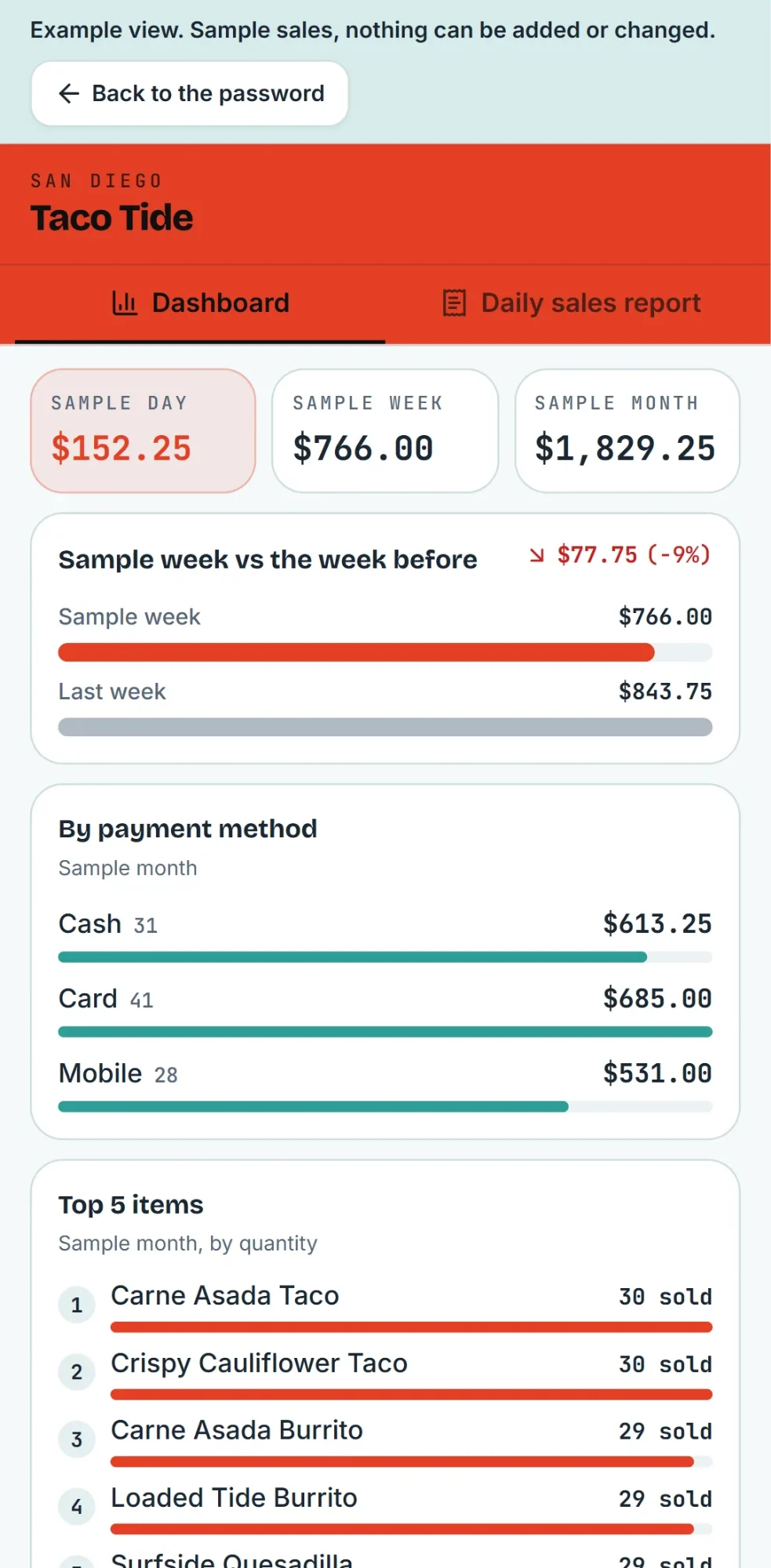
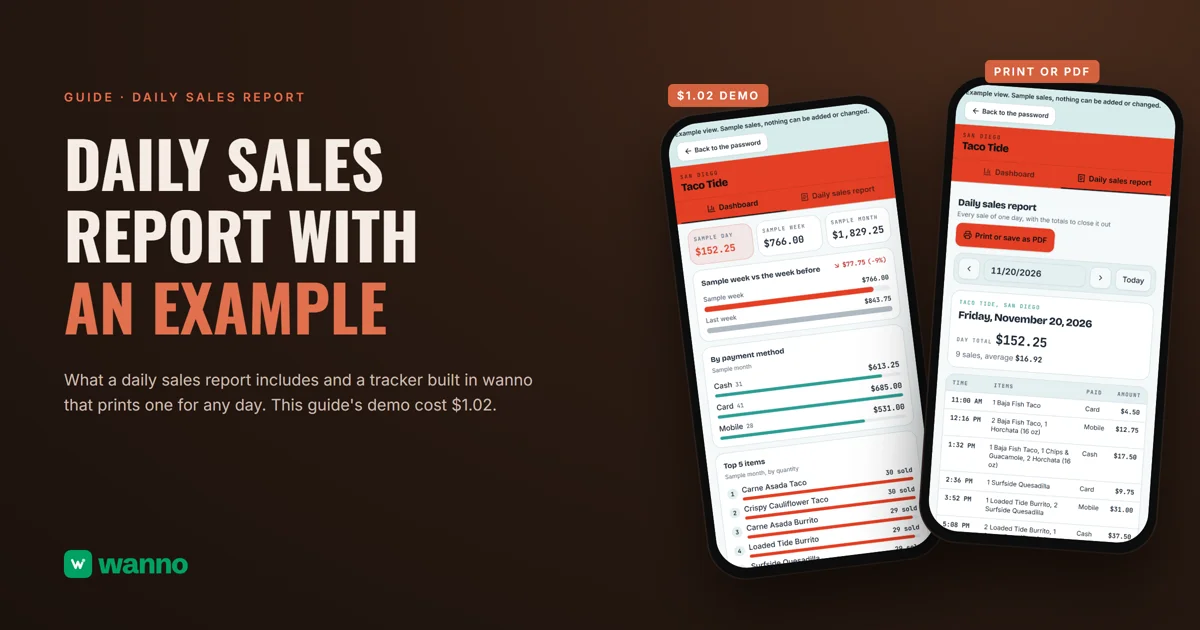
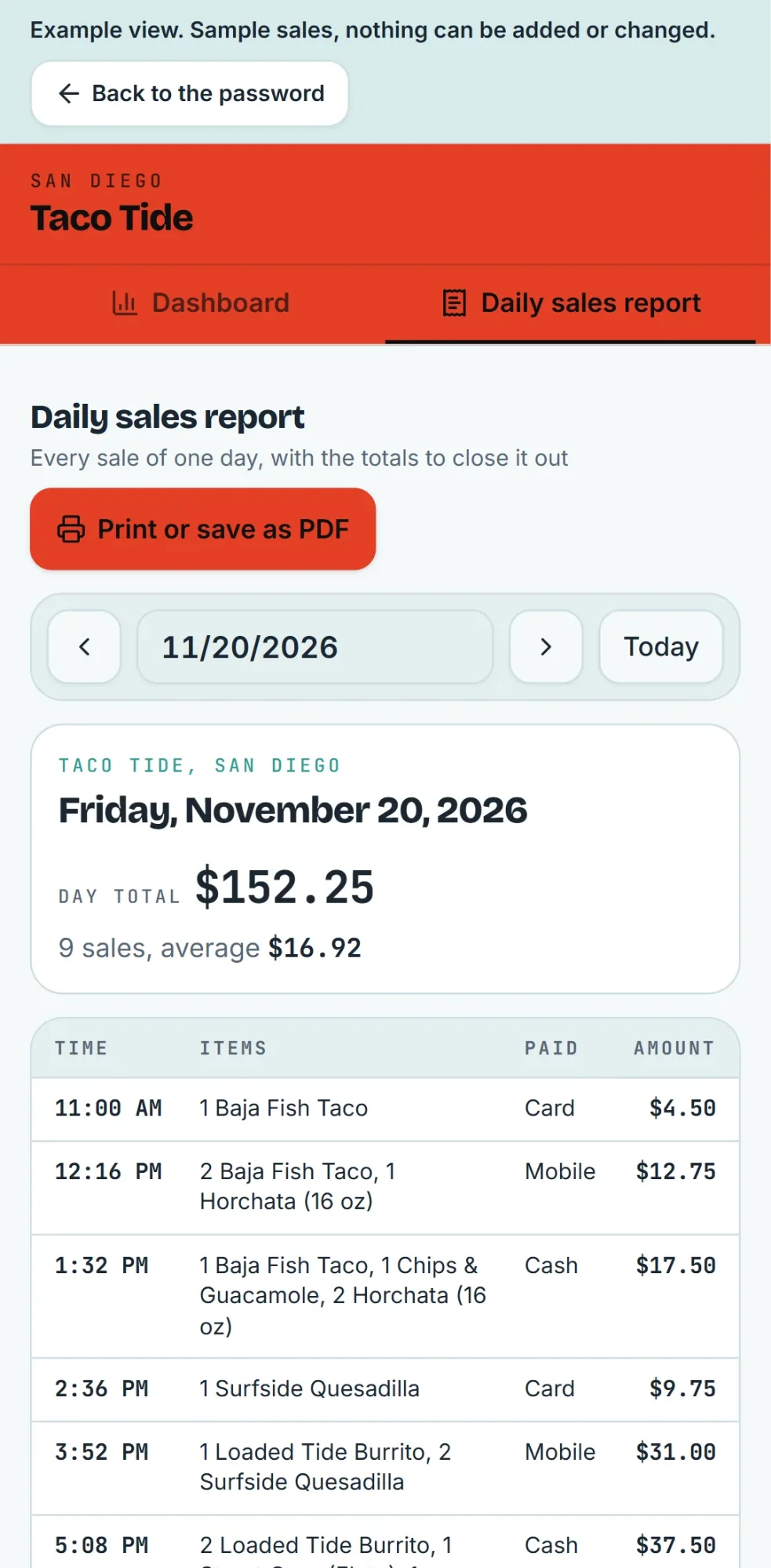
What you get is an app with a Counter tab, where you tap items from the menu, set the quantity in the tray, choose cash, card or mobile and hit Save. A dashboard shows today, this week and this month, this week against last week with the dollar difference, the month's mix by payment method and the top 5 best sellers. A Daily sales report tab lets you pick a day with arrows or a calendar and lists each sale with its time, items, payment method and amount, plus totals by payment method, the number of sales, the average sale, the day total and a Print or save as PDF button. The example opens on Friday, November 20, 2026, with 9 sales between 11:00 AM and 8:44 PM and a $152.25 day total. Everything is saved in the cloud.
The Cash count tab shows the expected cash, the amount you counted and the difference, and lists past counts. The Owner tab, which activates when you choose your password, lets you edit, add, hide or re-price menu items and read the history grouped by day. It loads 10 menu items and two weeks of sales as samples. Some limits: this version does not handle tips, discounts or expenses, and it has no CSV export. The food truck and the amounts are examples, and it is good practice to log some real sales before you rely on it.
The cost: $1.02 is paid once and equals four days of free credit. For comparison, the wanno Starter plan costs $4.99 a month with $10 in credits included, about $0.17 a day, every day (see plans).
Build your daily sales report in wanno
Describe your business, your menu and your payment methods in wanno, and have your first daily sales report with a cash count running on your phone.
Frequently asked questions
What is a daily sales report? A daily sales report is the record of every sale a business makes in a day, with items, quantities, prices and payment method, totaled at close. It tells you what came in and whether the cash matches. With wanno you can build yours on your phone, with totals and a cash count.
How do you create a daily sales report in Excel? Make one row per sale with date, item, quantity, unit price, amount and payment method, then add formulas that total the amounts by day and by payment method. The example in this guide gives you the columns to copy. It works well for a few sales and one computer.
What should a daily sales report include? Date, items sold, quantity, unit price, amount, sale total and payment method, plus who rang it up if several people work the counter. The numbered list in this guide gathers the ten usual fields.
Does the IRS require a daily sales report? Not in a fixed format. IRS Publication 583 says to keep supporting documents for your gross receipts and describes a daily summary of cash receipts as part of a simple recordkeeping system. How long to keep records depends on your case, so confirm yours with your accountant.
How do you do an end-of-day cash count? Add your opening cash float to the day's cash sales to get the expected cash, count the drawer, and write down the difference. Card and mobile payments are reconciled against your processor, not the drawer.
Can I make one for free?
Yes. The wanno free plan gives a daily credit of $0.30 with a monthly cap of $1.50, and the app in this guide cost $1.02, which equals four days of free credit. On the free plan the page lives on a wanno.dev subdomain and carries the "Built with wanno" badge. You pay if you want to remove the badge, use your own domain or ask for more changes than the credit covers.
Read next: How to make a payment receipt