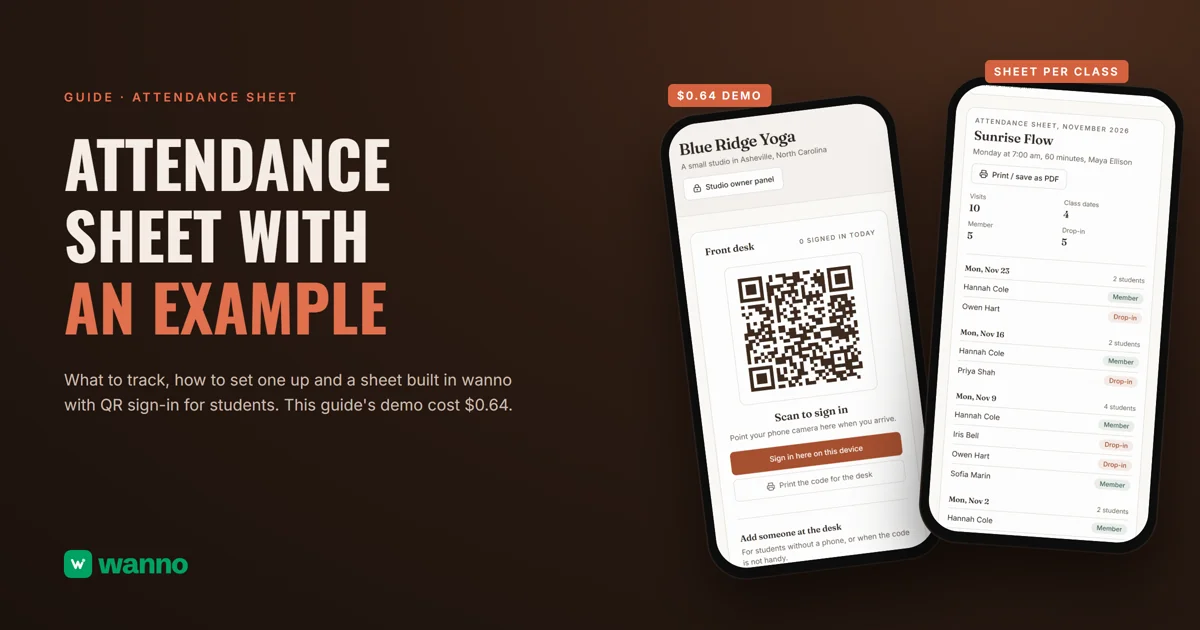
An attendance sheet is the record of who showed up to each class, workshop or course, with the date, the group and every person's name. This guide is written for the owner of a business that sells classes (a yoga studio, a language academy, a dance school, a training company), not for a school classroom: it explains what an attendance sheet is, what it includes, gives you a complete example to copy and compares keeping it on paper, in Excel or with a QR code. The sample app, for an invented yoga studio in Asheville, was built in wanno, a platform that builds websites and apps with AI from your phone, in 4 minutes 58 seconds and cost $0.64 with adjustments included.
In short: an attendance sheet is a table with the students of a group in the rows and the class dates in the columns, where you mark whether each person was present, absent, late or excused. It carries the group, the teacher, the dates, each student's name, their status in every class and an attendance percentage. In the United States, we found no federal rule that requires a private business to keep one, so its value is practical: billing correctly, spotting dropouts and proving a class took place.
Updated November 21, 2026.
At a glance: what an attendance sheet tells you
| What the sheet shows | Decision it supports |
|---|---|
| Visits per student | how much of a class pack was used and how much is left |
| Misses in a row | who to message before they drop out |
| Percentage per class | whether the day, time or level works |
| Record by date | proof the class ran and who came |
01. What is an attendance sheet and what is it for?
An attendance sheet is a record, class by class, of who was present and who was not. People also call it a sign-in sheet or an attendance register. In a business that sells classes it mostly does three jobs:
- Billing correctly: if you sell class packs, memberships with a visit limit or drop-in classes, the sheet tells you how many were used and how many remain.
- Catching dropouts early: someone who stops coming often stops paying soon after, and a run of misses gives you room to reach out. This is a rule of thumb from the trade, not a hard rule.
- Backing up a claim: a company that books a workshop for its team, a parent paying for a child's class or a funder of a training program may want proof that the class happened and who attended.
02. What an attendance sheet should include
A complete attendance sheet carries the details of the group, of each student and of each class. This is the usual list in the trade, not a standard:
- Business or program name.
- Class or group, for example "Vinyasa, Tuesdays".
- Teacher or instructor for each class.
- Date and time of each class.
- Location or room, if you have more than one.
- Each student's full name, with no duplicates or nicknames you will not find later.
- Status of each student in each class: present, absent, late or excused.
- Signature or confirmation: on paper it is a signature, with a QR it is the sign-in from the student's phone.
- Student type: member, drop-in or trial class.
- Notes, such as the reason for an excused absence.
- Total visits and attendance percentage for each student.
- Who took attendance and when it was reviewed.
Ask only for what you will use: an email or phone number makes sense if you will really reach out that way.
03. Attendance sheet example, complete and ready to copy
This is one month of a sample group at an invented yoga studio: Vinyasa on Tuesdays, with 6 students and 4 classes in October 2026. Mark P (present), L (late), A (absent) and E (excused absence).
- Business: Blue Ridge Yoga, Asheville.
- Class: Vinyasa, Tuesdays, 6:00 to 7:15 pm.
- Teacher: Dana Whitfield.
- Month: October 2026.
| Student | Oct 6 | Oct 13 | Oct 20 | Oct 27 | Visits | Attendance |
|---|---|---|---|---|---|---|
| Emma Clarke | P | P | P | P | 4 of 4 | 100% |
| Noah Bennett | P | P | L | P | 4 of 4 | 100% |
| Olivia Reed | P | A | P | P | 3 of 4 | 75% |
| Liam Foster | P | P | A | P | 3 of 4 | 75% |
| Ava Brooks | E | P | P | P | 3 of 4 | 75% |
| Mason Hayes | P | A | A | A | 1 of 4 | 25% |
| Class | 18 of 24 | 75% |
The rule in the example: a late arrival counts as a visit and an excused absence does not, although you log the reason. Each percentage is visits divided by classes (3 of 4 is 75%) and the class figure is total visits divided by the total possible (18 of 24). Mason Hayes has missed three in a row: that is the alert discussed below. To copy it, change names and dates and keep the structure. All the data is invented.
04. Attendance sheet on paper, in Excel or with a QR code
All three work; here is the honest comparison:
| Format | Strength | Limit | Fits if |
|---|---|---|---|
| Paper | needs nothing and keeps a handwritten signature | you have to copy the data elsewhere to add it up, and the sheet gets lost | you run one small group and keep little history |
| Excel or a spreadsheet | adds up totals and percentages on its own, and it is free | someone has to enter every class, and students do not sign or confirm anything | you run several groups and are comfortable with formulas |
| QR with an app | each student signs in from their phone and the totals come out on their own | relies on everyone having a phone and on nobody signing in for someone else | you have many students or several classes a day |
With a QR there is one risk worth naming: a student can sign in a friend.
05. How to make an attendance sheet, step by step
To make an attendance sheet, define the group, load the students, create one column per class, mark each student's status and work out the percentage when the month closes. These are the steps:
- Define the class or group and its schedule: name, days, time and teacher.
- Load the students with their full name and, if you will use it, a contact.
- Create one column per class with its date, for the whole month.
- Pick the statuses you will use (present, absent, late, excused) and what counts as a visit.
- Take attendance at the start of class, not the end, so you do not forget who came late.
- Write down the reason for each excused absence.
- Work out each student's total and percentage when the month closes.
- Check misses in a row and message anyone who passed the limit you set.
- Keep a PDF copy of the month in case someone asks for proof.
If you sell by the pack, check this sheet against your price list and with each student's payment receipt to see which classes are already paid.
06. How to read your attendance sheet
An attendance sheet pays off when you read it, not only when you fill it in: look first for misses in a row, then each student's percentage and last the class percentage. These are rules of thumb from the trade, not hard rules:
- Three misses in a row: a good trigger to reach out. In the example, Mason Hayes went from attending to missing three Tuesdays in a row.
- A low percentage for one student: look for a pattern first before assuming they lost interest.
To plan your own team around these numbers, see how to keep an employee attendance tracker and how to build a shift schedule.
07. Attendance sheet and student data in the United States
In the United States, we found no federal rule that requires a private class business to keep an attendance sheet, or one that regulates the data of its students. The one federal rule that can come into play is child privacy, and only in a specific case. The text of the federal rule is reproduced by the Cornell Law School Legal Information Institute, which is not a government site.
- Under 16 CFR 312.2, a child is an individual under the age of 13.
- Under 16 CFR 312.3, it is unlawful for an operator of a website or online service directed to children, or one with actual knowledge that it collects personal information from a child, to collect that information in a way that violates the rules of that part.
In plain terms, that is the Children's Online Privacy Protection Act rule (COPPA), and it concerns websites and online services. A paper sheet does not fall under it. If your QR sign-in collects names or emails of children under 13, that rule can apply, and state laws on student data vary: confirm your case with a lawyer.
08. Put it into practice: an attendance sheet app with QR and panel
This is the exact prompt used in wanno for Blue Ridge Yoga:
I want an attendance app for my yoga studio in Asheville, Blue Ridge Yoga: the weekly classes with day, time and teacher, a QR code at the front desk so students sign in from their phone with their name and email, and an attendance sheet for each class with who came, marked as member or drop-in. Show monthly totals per class and per student, highlight members who have not come in 3 weeks, and let me print or save each attendance sheet as PDF. Load 4 sample classes with 10 students and save everything in the cloud. The QR sign-in opens without signing in and only the panel asks for a password. Everything visible in the app must be in English.
wanno built it on its own: 4 minutes 58 seconds, 100 steps and $0.64 in total, which includes adjustments to set the sample dates in November 2026, remove long dashes, add a "See an example" button that opens a read-only view without a password, stop students repeating on the sheets, fit the sheets to a phone screen and fix the browser tab title. It ran on its test link.
This is the front desk screen with the sign-in QR code:
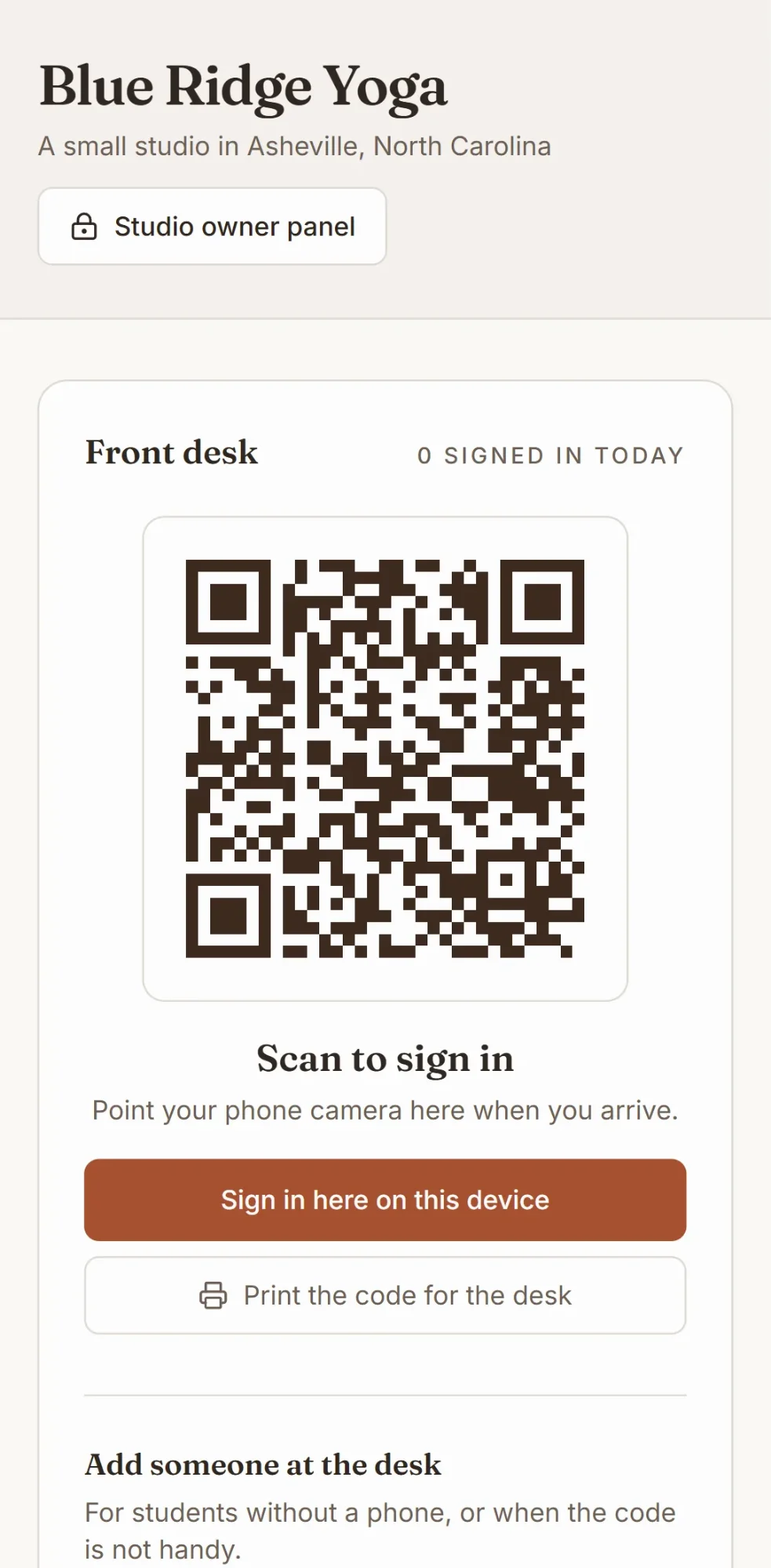
What you get is a front desk screen with a "Scan to sign in" QR code, the week's 4 classes with day, time and teacher, and a list of who signed in today. A student scans the code and lands on a phone form: they pick the class, enter their name and email and say whether they are a member or a drop-in. There is no login, and the sign-in appears on the desk screen within seconds. Staff can also add someone at the desk. 4 classes and 10 students come loaded, and everything is saved in the cloud.
The read-only "See an example" view shows a sheet like this one, with sample data for Sunrise Flow across November 2026:
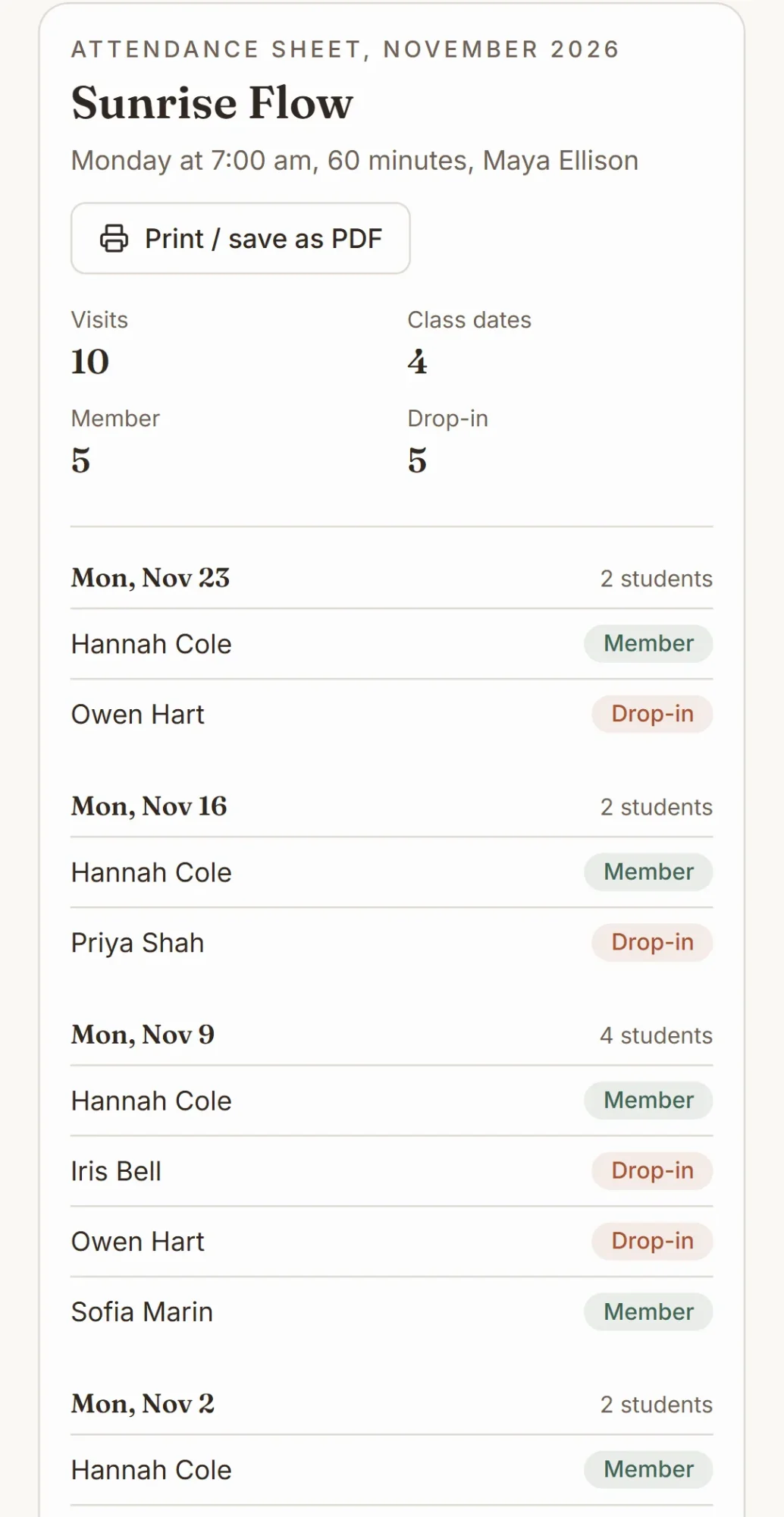
The owner panel, which activates when you choose your password, is the only part that asks for one. Each class opens its attendance sheet with who came and a member or drop-in tag, and a print button saves a PDF of that sheet. The panel shows this month's totals per class and per student, and members who have not come in 3 weeks are highlighted at the top. The studio and the students are examples, and it is good practice to test it with one of your own classes. The demo does not replace a privacy notice.
The cost: $0.64 is paid once and equals three days of free credit. For comparison, the wanno Starter plan costs $4.99 a month with $10 in credits included, about $0.17 a day, every day (see plans).
Create your attendance sheet in wanno
Describe your studio, your classes and how you want students to sign in in wanno, and have your first attendance sheet ready with a QR code for the front desk.
Frequently asked questions
What is an attendance sheet? An attendance sheet is the record of who was present at each class, workshop or course, with the date, the group and each person's name. In a business that sells classes it helps you bill correctly, spot dropouts and prove a class took place. With wanno you can build yours, with a QR code so students sign in themselves.
What is an attendance sheet called? It is also called a sign-in sheet or an attendance register: a record of who came on which date. A roll call is the act of checking who is there, and a class roster is the list of enrolled students the sheet starts from. This guide uses "attendance sheet" for the table of students by class date.
How do you make an attendance sheet? Define the class and its schedule, load the students, create one column per class, mark each student's status at the start of class and work out the percentage when the month closes.
How do you make an attendance sheet in Excel?
Put one student per row and one date per column, mark P, L, A or E in each cell and total the visits with two COUNTIFs over the row, one for P and one for L, for example =COUNTIF(B2:E2,"P")+COUNTIF(B2:E2,"L"). The percentage is that total divided by the number of classes.
Is an attendance sheet required by law? We found no federal rule that requires a private business to keep one, so it is a management tool. What can matter is the data it collects: COPPA applies to online collection from children under 13, and state laws vary. For your case, confirm with a lawyer.
Can I make one for free?
Yes. The wanno free plan gives a daily credit of $0.30 with a monthly cap of $1.50, and the app in this guide cost $0.64, which equals three days of free credit. On the free plan the page lives on a wanno.dev subdomain and carries the "Built with wanno" badge. You pay if you want to remove the badge, use your own domain or ask for more changes than the credit covers.
Read next: How to price a product