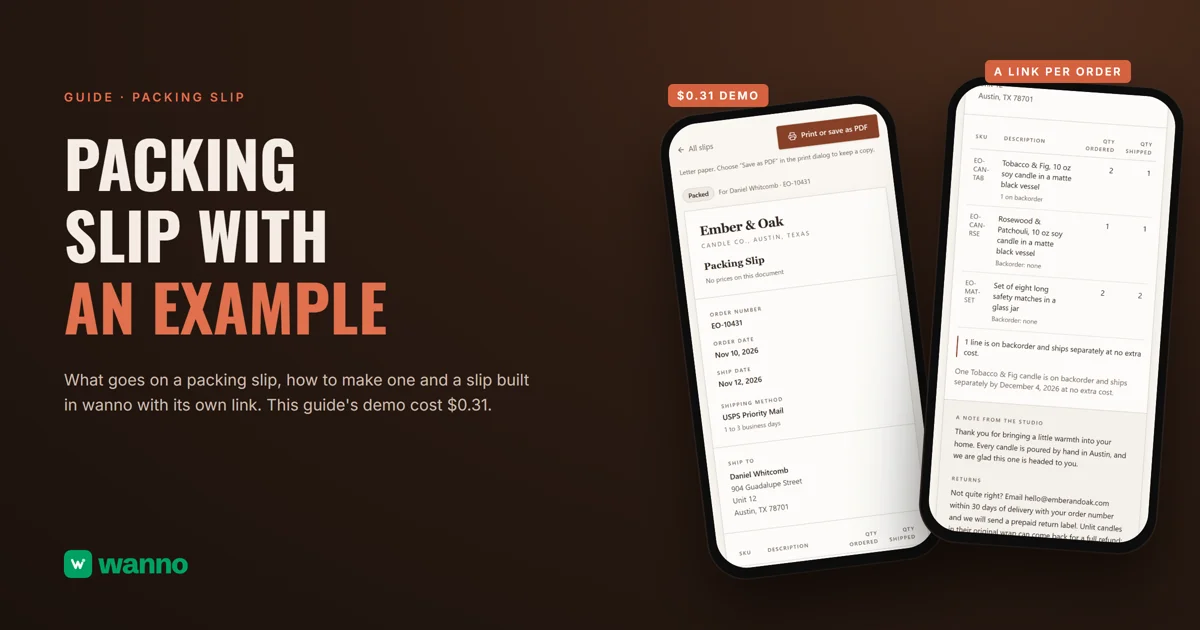
A packing slip is the document that goes inside the box with an order and lists what was shipped, in what quantity and to whom, usually without prices. This guide explains what a packing slip is, what it includes, how to fill one in with a complete example you can copy, what to do with a backorder or a damaged item, and how it differs from a receipt, an invoice, a shipping label and a bill of lading. The example, for an invented candle shop in Austin, was built in wanno, a platform that builds websites and apps with AI from your phone, in 3 minutes 1 second and cost $0.31 with adjustments included.
In short: a packing slip is a document the seller puts in or on a shipment that itemizes what is inside: order number, dates, ship-to address, each item with SKU, quantity ordered and quantity shipped, and any backorder. It usually shows no prices. It is not a receipt, an invoice or a shipping label, and it does not replace the carrier's bill of lading.
Updated November 21, 2026.
At a glance: the documents in a shipment
| Document | Issued by | What it does |
|---|---|---|
| Purchase order | the buyer | places and authorizes the order |
| Packing slip | the seller | lists what is in the box |
| Shipping label | the seller or carrier | tells the carrier where to deliver |
| Invoice | the seller | asks for payment |
01. What is a packing slip and what is it for?
A packing slip is an itemized list of the contents of a shipment, included with the package so the person receiving it can check what arrived against what was ordered. It is also called a packing list or a delivery note. It answers one question: what is in this box?
For an online store, it does three jobs:
- Lets the customer check the order: the buyer opens the box and compares each item and quantity with the slip.
- Records what shipped: if something is missing or damaged, the slip is the starting point of the conversation.
- Flags backorders: when an item is not in stock, the slip says what is coming later, so the customer is not left guessing.
It also helps your own team: whoever packs the order uses the slip as a checklist.
02. What a packing slip includes
A complete packing slip includes the order details, the ship-to address, the items and a short note for the customer. This is the usual list in the trade, not a rule:
- Order number, unique and consecutive.
- Order date and ship date.
- Seller details: business name, address, email or phone.
- Ship-to name and address: where the package goes.
- Shipping method: ground, express, pickup.
- SKU of each item, the code you use in your inventory.
- Description of each item.
- Quantity ordered and quantity shipped for each line.
- Backorder: anything ordered that did not ship yet.
- Thank-you note.
- How to request a return or report a problem.
- Prices: usually left off, which lets the slip travel in a gift order without showing what it cost.
03. Packing slip example to copy
This example uses Ember & Oak Candle Co., the invented candle shop in Austin from the demo. The header comes first, then the table of items. The business, the customer and the SKUs are examples, and there are no prices on purpose.
- Seller: Ember & Oak Candle Co., Austin, TX
- Order number: EO-1001
- Order date: November 9, 2026
- Ship date: November 12, 2026
- Ship to: Maya Torres, 1420 Maple St, Portland, OR 97205
- Shipping method: Ground, 3 to 5 business days
| SKU | Description | Qty ordered | Qty shipped | Backorder |
|---|---|---|---|---|
| EO-101 | Cedar & Amber candle, 8 oz | 3 | 3 | 0 |
| EO-102 | Fig & Vanilla candle, 8 oz | 2 | 2 | 0 |
| EO-103 | Sandalwood candle, 12 oz | 2 | 1 | 1 |
| EO-210 | Wick trimmer | 1 | 1 | 0 |
| EO-401 | Box of matches | 1 | 1 | 0 |
| Total | 9 | 8 | 1 |
- Backorder note: 1 Sandalwood candle, 12 oz, ships separately as soon as it is back in stock.
- Thank-you note: "Thank you for your order. We hope you love your candles."
- Returns: "To request a return, reply to your order email within 30 days." The 30 days are an example: use your own policy.
To copy it, change the details and keep the structure. The arithmetic is simple: ordered minus shipped equals backorder on each line, and the totals add each column. Here, 3 + 2 + 2 + 1 + 1 = 9 ordered, 3 + 2 + 1 + 1 + 1 = 8 shipped and 9 minus 8 = 1 on backorder.
04. How to make a packing slip step by step
To make a packing slip, take the order, assign the number, list each item with the quantity ordered and shipped, note any backorder and put the slip in the box. These are the steps:
- Take the order and confirm it is paid or approved.
- Assign the order number that follows in your series.
- Fill in the dates: order date and ship date.
- Add the ship-to name and address exactly as the customer wrote them.
- List each item with SKU and description.
- Enter quantity ordered and quantity shipped for each line.
- Note any backorder and when you expect to ship it.
- Choose the shipping method.
- Add the thank-you note and the returns instructions.
- Print it or save it as PDF and put it in the box, or on the outside in a pouch.
If the order comes from a business customer with a purchase order, copy the PO number into the slip. To make sure what you pack matches what you have, inventory management tells you what is in stock before you promise it.
05. What to do with a backorder or a damaged item
When an item is out of stock or arrives damaged, the packing slip is where the problem gets recorded: it states what shipped and what did not, and the customer compares it with the box. The cleaner the slip, the shorter the conversation.
- Ship what you have and mark the rest as backorder, with the quantity.
- Tell the customer the expected date, in the slip and in the order email.
- Ship the backorder separately and, if you can, with its own slip showing the same order number.
- For damage, ask for a photo of the item and of the box, and state the remedy: replacement, refund or credit.
- Keep a copy of every slip, so you can compare it with what the customer says they received.
If you deliver in person or to a business, add a signature line at the bottom. A name and a signature turn the slip into proof of receipt, and anything written next to the signature is what can be claimed later.
06. Packing slip vs receipt, invoice, shipping label and bill of lading
A packing slip lists what is in the box, a receipt proves payment, an invoice asks for payment, a shipping label tells the carrier where to go and a bill of lading is the carrier's document for the freight. Each one answers a different question:
| Document | Who issues it | What it answers |
|---|---|---|
| Packing slip | the seller | what is inside the shipment |
| Receipt | the seller | that the customer paid |
| Invoice | the seller | how much is owed and by when |
| Shipping label | the seller or carrier | where the package goes and how |
| Bill of lading | the carrier | what freight was handed over to be moved |
Is a packing slip a receipt? No. A packing slip says what was shipped and normally carries no prices; a receipt says how much was paid. If you need a proof of payment, see our guide on the payment receipt. Is a shipping label the same as a packing slip? Not that either: the label travels on the outside and carries the address and the tracking code, while the slip travels inside and lists the contents. And a bill of lading is not a packing slip: it is issued by the carrier, as the next section explains.
07. The legal side: the packing slip is not the bill of lading
In the United States, the federal rule that appears in this area regulates the carrier's bill of lading, not the seller's packing slip. Under 49 CFR 373.101, a motor carrier subject to the rule must issue a receipt or bill of lading for property tendered for transportation in interstate or foreign commerce. According to the text of the rule, it includes the names of consignor and consignee, origin and destination, number of packages, description of the freight and weight or volume where it applies to the rate.
The rule applies to the for-hire motor carrier that moves the freight, so it is the carrier's document. The packing slip, in practice, is a commercial and control document that the seller prepares for the customer. A separate section, 49 CFR 373.103, covers the carrier's freight bill with the rate and the total charges, which is again the carrier's bill and not the seller's invoice.
For your own case, such as shipping regulated goods or international orders, check with your carrier or an advisor. The demo does not issue invoices or tax documents: it creates the packing slip and its link.
Put it into practice: a packing slip app with link and panel
This is the exact prompt used in wanno for Ember & Oak Candle Co.:
I want an app to create packing slips for my online candle shop in Austin, Ember & Oak Candle Co.: an automatic order number, order date and ship date, ship-to name and address, line items with SKU, description, quantity ordered and quantity shipped, anything on backorder, the shipping method, a short thank-you note and how to request a return. Prices are hidden on the packing slip. Each packing slip has its own link, it can be printed on letter paper or saved as PDF, and there is a panel with every order and its status (packed, shipped, delivered). Load 3 sample packing slips and save everything in the cloud. The link of each packing slip opens without signing in and only the panel asks for a password. Everything visible in the app must be in English.
wanno built it on its own: 3 minutes 1 second, 81 steps and $0.31 in total, which includes adjustments to set the sample dates in November 2026 and to add a one-line note with the backorder date. It ran on its test link.
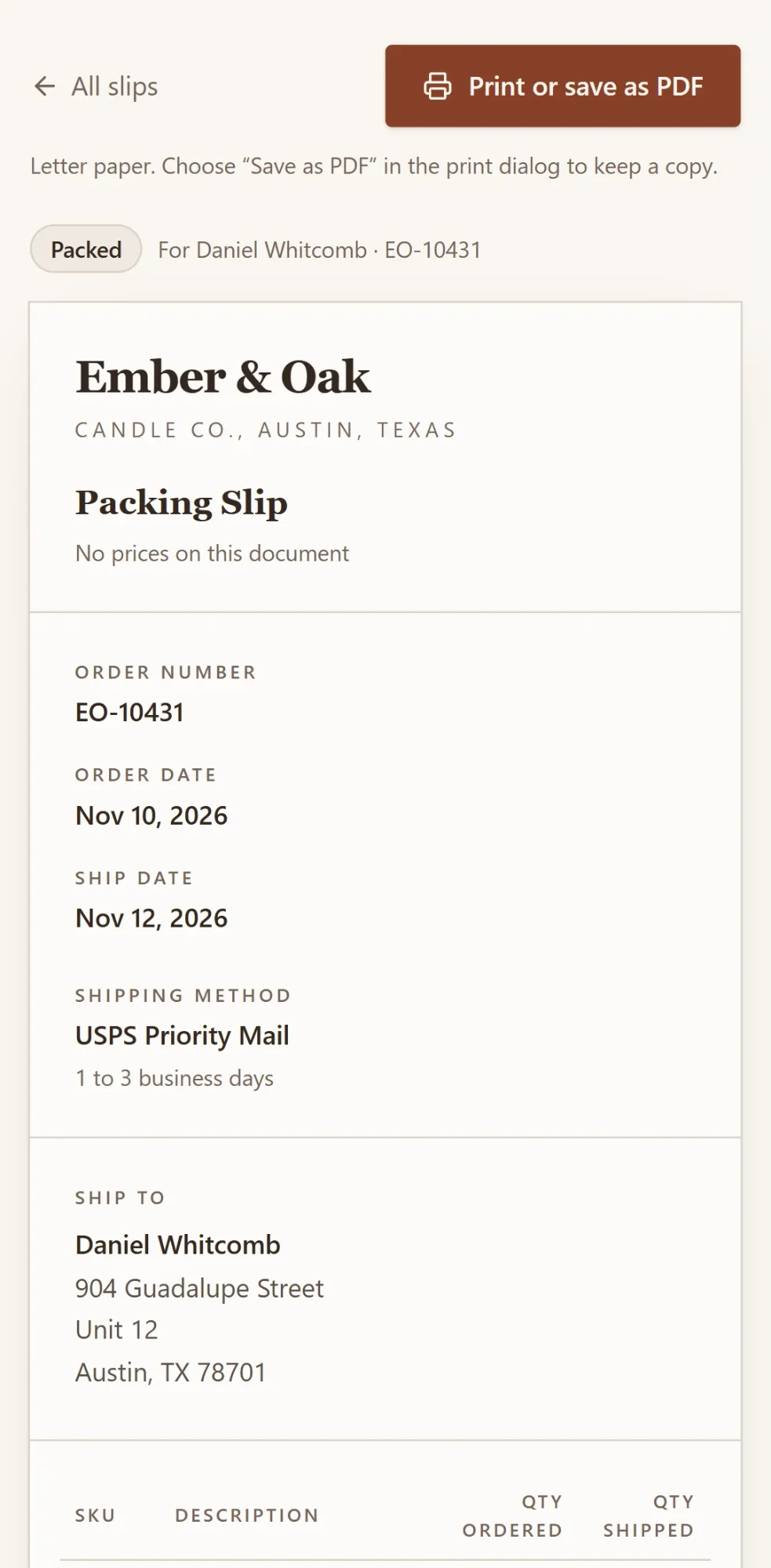
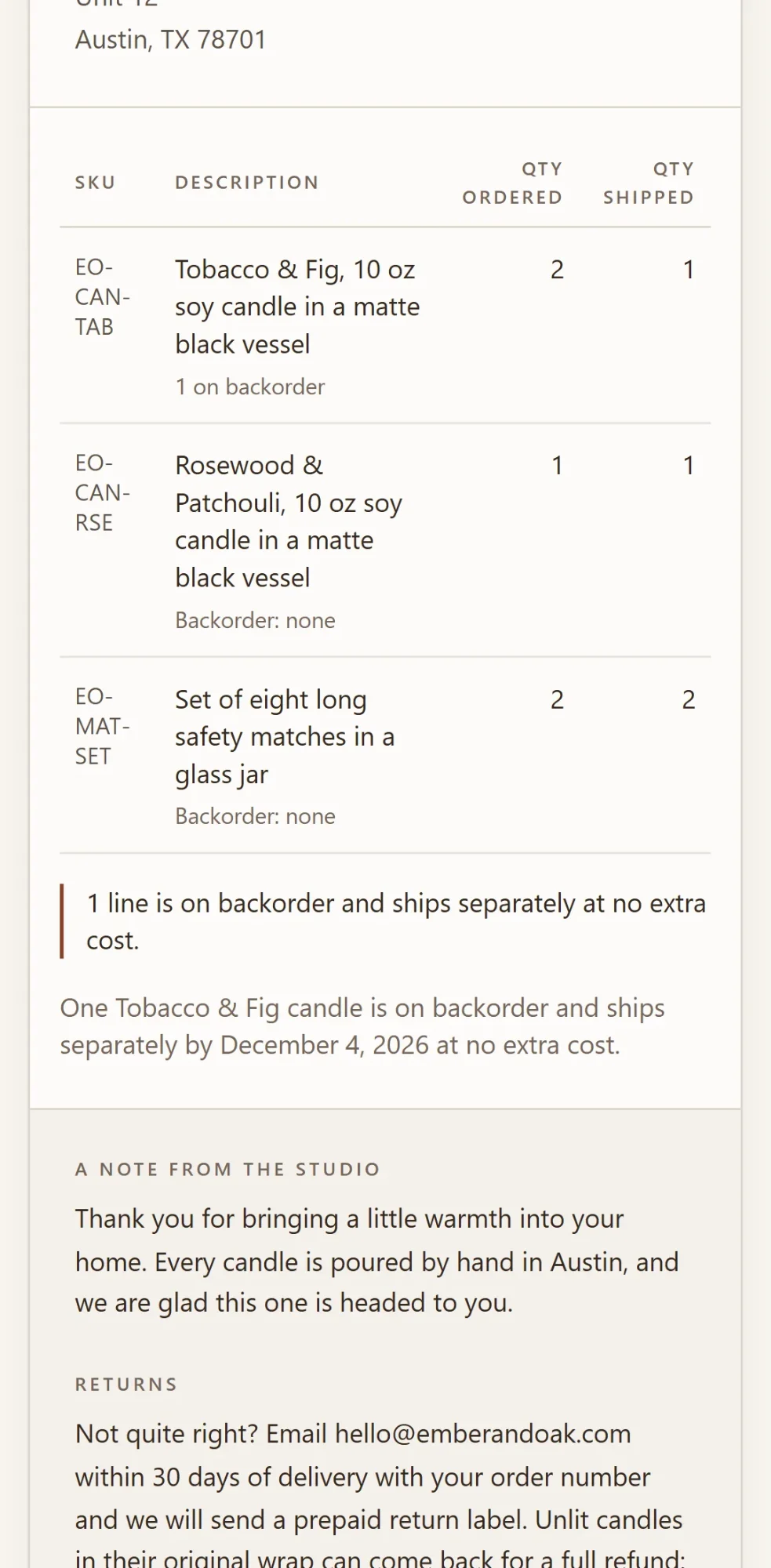
What you get is an app with three sample slips (one packed with a candle on backorder, one shipped, one delivered), each with its own link that opens without signing in. Each slip shows the order number, the order and ship dates, the ship-to name and address, the shipping method, and every line with SKU, description, quantity ordered and quantity shipped, plus the backorder note with its ship-by date of December 4, 2026, the thank-you note and how to request a return. There are no prices anywhere. Everything is saved in the cloud.
A Print button prepares the slip for letter paper, and Save as PDF works from the same dialog. The panel, which activates when you choose your password, lists every order with its status, with buttons to switch between packed, shipped and delivered and a button to copy each slip's link. One limit: this version has no form to create a new packing slip from the panel, so the three samples are what you start with. The candle shop, the customers and the SKUs are examples.
The cost: $0.31 is paid once and equals two days of free credit. For comparison, the wanno Starter plan costs $4.99 a month with $10 in credits included, about $0.17 a day, every day (see plans).
Create your packing slips in wanno
Describe your shop, your items and your shipping options in wanno, and have your first packing slip ready to print or share by link.
Frequently asked questions
What is a packing slip? A packing slip is a document placed in or on a shipment that lists what is inside: order number, dates, ship-to address, each item with quantity ordered and shipped, and any backorder. It usually shows no prices. With wanno you can build yours, with its own link and a print button.
Is a packing slip a receipt? No. A packing slip lists what was shipped, while a receipt proves that a payment was made. A packing slip normally shows no prices and does not say how much the customer paid.
What is the difference between a shipping label and a packing slip? A shipping label goes on the outside of the package and carries the address and tracking information for the carrier; a packing slip goes inside and lists the contents for the customer. You normally need both for an online order.
Is a bill of lading the same as a packing slip? No. A bill of lading is the carrier's document for freight, and 49 CFR 373.101 sets what a motor carrier must include in it. A packing slip is the seller's list of contents for the customer.
Can I make one for free?
Yes. The wanno free plan gives a daily credit of $0.30 with a monthly cap of $1.50, and the app in this guide cost $0.31, which equals two days of free credit. On the free plan the page lives on a wanno.dev subdomain and carries the "Built with wanno" badge. You pay if you want to remove the badge, use your own domain or ask for more changes than the credit covers.
Do I have to include a packing slip with every order? Including a packing slip with every order is common practice, because it makes returns and mistakes easier to solve. For regulated goods or specific carriers, check with the carrier. With wanno you can set up the slip once and reuse the structure for every order.
Read next: How to make a price list